






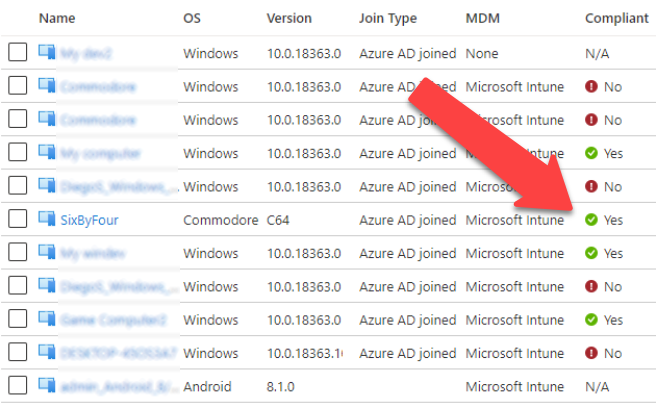
In my earlier weblog I demonstrated methods to create
a Persistent Refresh Token (PRT) by becoming a member of imaginary gadget to Azure AD.
On this weblog, with AADInternals v0.4.2, I’ll present methods to make these gadgets compliant, permitting bypassing compliance associated conditional entry (CA) insurance policies.
When utilizing cloud providers, the safety perimeter extends past the standard on-prem community, as customers can devour the providers wherever they’ve entry to web.
As such, organisations should not anymore capable of shield their providers with conventional strategies like firewalls.
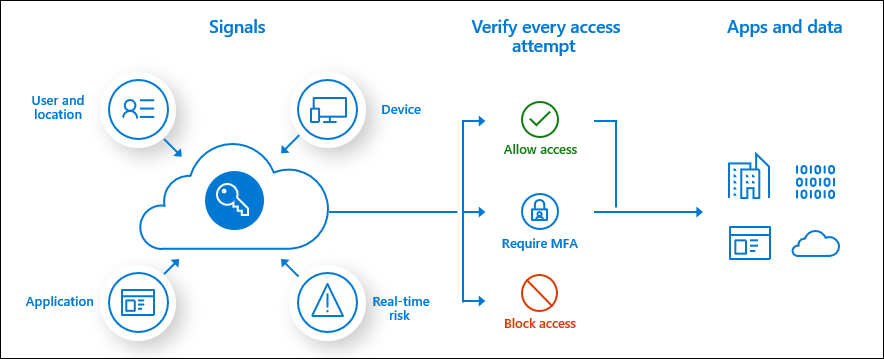
Nevertheless, when customers are consuming providers similar to Workplace 365, Azure AD receives certains “indicators” concerning the consumer. These indicators are associated to the consumer, consumer’s gadget, location, and many others.
In line with the documentation:
Conditional Entry is the instrument utilized by Azure Energetic Listing to deliver indicators collectively, to make selections, and implement organizational insurance policies. Conditional Entry is on the coronary heart of the brand new identification pushed management aircraft.
The next image from the identical documentation explains the method fairly properly. Primarily based on the indicators, we are able to configure the Azure AD to permit or deny entry to providers.
One of many typical eventualities is to grant entry if the gadget used to entry the service is marked as compliant.
The gadget is marked as compliant when it’s enrolled to Microsoft Intune, which is
Microsoft’s cloud-based Cell Gadget Administration (MDM) and Cell Utility Administration (MAM) service, and it fulfills the necessities of the outlined insurance policies.
Intune is a component Enterprise Mobility + Safety (EMS) suite, which implies extra :greenback: to be spent.
When the gadget is enrolled to Intune, the gadget will get a certificates for use to speak with Intune. Which means that the certificates is the one authentication methodology used to determine the gadget.
After enrollment, the gadget “calls again” to Intune to obtain insurance policies and to ship details about its state. Intune makes use of MDM and MDM 2 protocols.
Technically, in response to Microsoft documentation,
the MDM shopper makes use of AAD Graph API to report back to Azure AD the compliance standing.
Registering gadget to Azure AD
Within the earlier weblog we joined an imaginary gadget to Azure AD. Let’s go this time a bit additional and make the gadget compliant!
Let’s begin by getting an entry token for becoming a member of our gadget to Azure AD.
# Get an entry token for AAD be part of and save to cache
Get-AADIntAccessTokenForAADJoin -SaveToCache
Now we are able to be part of our Commodore 64 to Azure AD!
Notice! Within the Azure AD, the gadget info similar to title and OS model are solely informative.
# Be a part of the gadget to Azure AD
Be a part of-AADIntDeviceToAzureAD -DeviceName "SixByFour" -DeviceType "Commodore" -OSVersion "C64"
Output needs to be just like beneath. The gadget is now registered to Azure AD and the corresponding certificates
is saved to the present listing.
Gadget efficiently registered to Azure AD:
  DisplayName:     "SixByFour"
  DeviceId:        d03994c9-24f8-41ba-a156-1805998d6dc7
  Cert thumbprint: 78CC77315A100089CF794EE49670552485DE3689
  Cert file title : "d03994c9-24f8-41ba-a156-1805998d6dc7.pfx"
Native SID:
  S-1-5-32-544
Extra SIDs:
  S-1-12-1-797902961-1250002609-2090226073-616445738
  S-1-12-1-3408697635-1121971140-3092833713-2344201430
  S-1-12-1-2007802275-1256657308-2098244751-2635987013
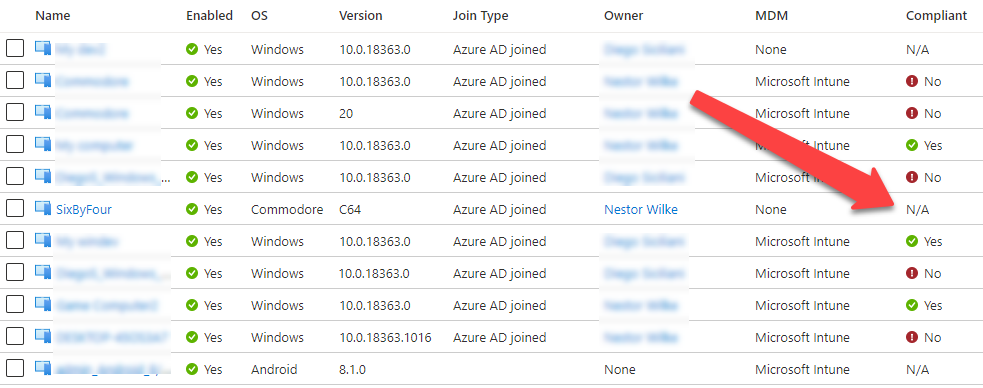
Now the gadget is accessible at Azure AD gadgets. However, as we will be see, it’s not marked as compliant (but).
Marking gadget compliant – choice 1: Registering gadget to Intune
The primary choice to make the gadget compliant is to enroll it to MDM and hope that there are not any insurance policies assigned.
So, subsequent we want an entry token for Intune MDM. This token should have the deviceId declare, so we’re utilizing the gadget certificates to get one (we may additionally use the PRTToken).
# Get an entry token for Intune MDM and save to cache (prompts for credentials)
Get-AADIntAccessTokenForIntuneMDM -PfxFileName .d03994c9-24f8-41ba-a156-1805998d6dc7.pfx -SaveToCache
Now that we’ve got the entry token, we are able to enroll the gadget to Intune:
# Be a part of the gadget to Intune
Be a part of-AADIntDeviceToIntune -DeviceName "SixByFour"
Output needs to be just like beneath. The gadget is now enrolled to intune and the corresponding certificates
is saved to the present listing.
Intune shopper certificates efficiently created:
  Topic:         "CN=d0d8b466-a652-4534-b7d8-54b4b436358c"
  Issuer:          "CN=Microsoft Intune MDM Gadget CA"
  Cert thumbprint: 475F772DC6C25E9FA0084D1F2B176883860408EE
  Cert file title:  "987b97c4-edf4-4e2f-9194-1205685de792-MDM.pfx"
  CA file title :   "987b97c4-edf4-4e2f-9194-1205685de792-MDM-CA.der"
  IntMedCA file :  "987b97c4-edf4-4e2f-9194-1205685de792-MDM-INTMED-CA.der"
The entire course of is as follows.
- A brand new RSA key pair is generated for the gadget.
- A certificates signing request (CSR) is generated for the gadget with CN=
. - A http request is made to “https://fef.<server>.handle.microsoft.com/StatelessEnrollmentService/DeviceEnrollment.svc?client-request-id=<requestId>” to register the gadget to Intune MDM
The request physique despatched to Intune:
<s:Envelope xmlns:s="http://www.w3.org/2003/05/soap-envelope" xmlns:a="http://www.w3.org/2005/08/addressing" xmlns:u="http://docs.oasis-open.org/wss/2004/01/oasis-200401-wss-wssecurity-utility-1.0.xsd" xmlns:wsse="http://docs.oasis-open.org/wss/2004/01/oasis-200401-wss-wssecurity-secext-1.0.xsd" xmlns:wst="http://docs.oasis-open.org/ws-sx/ws-trust/200512" xmlns:ac="http://schemas.xmlsoap.org/ws/2006/12/authorization">
	<s:Header>
		<a:Motion s:mustUnderstand="1">http://schemas.microsoft.com/home windows/pki/2009/01/enrollment/RST/wstep</a:Motion>
		<a:MessageID>urn:uuid:0d5a1441-5891-453b-becf-a2e5f6ea3749</a:MessageID>
		<a:ReplyTo>
			<a:Tackle>http://www.w3.org/2005/08/addressing/nameless</a:Tackle>
		</a:ReplyTo>
		<a:To s:mustUnderstand="1"><!--enrollment service url--></a:To>
		<wsse:Safety s:mustUnderstand="1">
			<wsse:BinarySecurityToken ValueType="urn:ietf:params:oauth:token-type:jwt" EncodingType="http://docs.oasis-open.org/wss/2004/01/oasis-200401-wss-wssecurity-secext-1.0.xsd#base64binary"><!--B64 encoded entry token--></wsse:BinarySecurityToken>
		</wsse:Safety>
	</s:Header>
	<s:Physique>
		<wst:RequestSecurityToken>
			<wst:TokenType>http://schemas.microsoft.com/5.0.0.0/ConfigurationManager/Enrollment/DeviceEnrollmentToken</wst:TokenType>
			<wst:RequestType>http://docs.oasis-open.org/ws-sx/ws-trust/200512/Problem</wst:RequestType>
			<wsse:BinarySecurityToken ValueType="http://schemas.microsoft.com/home windows/pki/2009/01/enrollment#PKCS10" EncodingType="http://docs.oasis-open.org/wss/2004/01/oasis-200401-wss-wssecurity-secext-1.0.xsd#base64binary"><!--B64 encoded CSR--></wsse:BinarySecurityToken>
			<ac:AdditionalContext xmlns="http://schemas.xmlsoap.org/ws/2006/12/authorization">
				<ac:ContextItem Title="UXInitiated">
					<ac:Worth>true</ac:Worth>
				</ac:ContextItem>
				<ac:ContextItem Title="HWDevID">
					<ac:Worth><!--64 char {hardware} ID--></ac:Worth>
				</ac:ContextItem>
				<ac:ContextItem Title="Locale">
					<ac:Worth>en-US</ac:Worth>
				</ac:ContextItem>
				<ac:ContextItem Title="TargetedUserLoggedIn">
					<ac:Worth>true</ac:Worth>
				</ac:ContextItem>
				<ac:ContextItem Title="EnrollmentData">
					<ac:Worth></ac:Worth>
				</ac:ContextItem>
				<ac:ContextItem Title="OSEdition">
					<ac:Worth>4</ac:Worth>
				</ac:ContextItem>
				<ac:ContextItem Title="DeviceName">
					<ac:Worth><!--device name--></ac:Worth>
				</ac:ContextItem>
				<ac:ContextItem Title="MAC">
					<ac:Worth>00-00-00-00-00-00</ac:Worth>
				</ac:ContextItem>
				<ac:ContextItem Title="DeviceID">
					<ac:Worth><!--device id--></ac:Worth>
				</ac:ContextItem>
				<ac:ContextItem Title="EnrollmentType">
					<ac:Worth>Gadget</ac:Worth>
				</ac:ContextItem>
				<ac:ContextItem Title="DeviceType">
					<ac:Worth>CIMClient_Windows</ac:Worth>
				</ac:ContextItem>
				<ac:ContextItem Title="OSVersion">
					<ac:Worth>10.0.18363.0</ac:Worth>
				</ac:ContextItem>
				<ac:ContextItem Title="ApplicationVersion">
					<ac:Worth>10.0.18363.0</ac:Worth>
				</ac:ContextItem>
			</ac:AdditionalContext>
		</wst:RequestSecurityToken>
	</s:Physique>
</s:Envelope>
Now the gadget is marked as compliant in Azure AD!
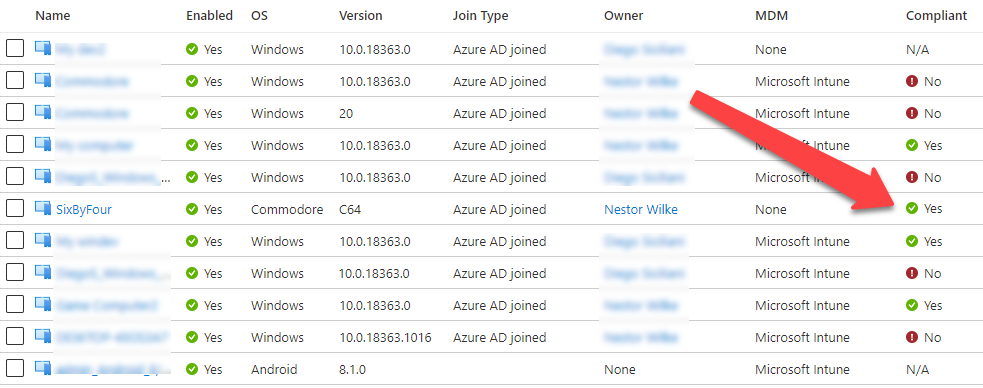
The identical gadget in Intune portal appears a bit completely different although:
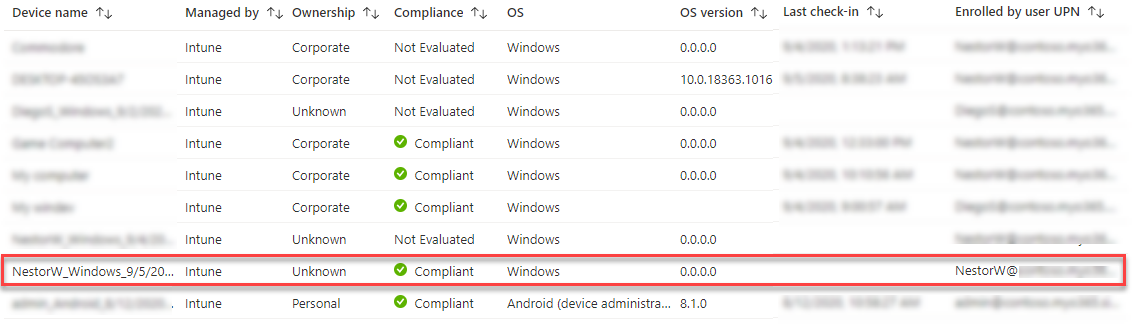
The title of the gadget is the default title given by Intune, its possession state is unknown and the gadget sort is Home windows (not Commodore). It’s because the in Intune the values
should not solely informative and Intune helps solely Home windows, iOS and Android gadgets.
We will additionally see that the gadget has not checked in in any respect. So, why is it marked as compliant then? In line with documentation,
by default, the compliance standing validity interval is 30 days. And, as in my demo tenant, there are not any compliance insurance policies set for Home windows gadgets so there may be nothing to evaluate.
In any case, we aren’t completed but, as we wish to set the gadget title to be identical than in Azure AD (SixByFour). As I discussed earlier, shoppers are speaking with Intune utilizing MDM protocol,
which utilises SyncML. SyncML is an xml based mostly language used to synchronise info between two events.
I used to be ready see the site visitors between a Home windows 10 VM and Intune with Fiddler by utilizing the MDM certificates for shopper authentication. Nevertheless, the content-type used was utility/vnd.syncml.dm+wbxml which signifies that the
content material was binary xml. Fortunately, I had already applied wbxml help to AADInternasl for Change Energetic Sync so all I needed to do was so as to add new code web page. After determining the startup
message, I used to be able to implement my very own Intune “shopper”.
I seen that Intune must also help non-binary xml, so tried to alter the content-type to utility/vnd.syncml.dm+xml and it labored like a attraction! This made debugging a a lot simpler job.
I created the Intune shopper in order that by default it solutions to all GET instructions with an error code 400 (Dangerous request) and to all SET, ADD, RESET, and DELETE instructions with 200 (All okay). For sure GET instructions, just like the gadget title, the
shopper solutions with 200 utilizing predefined values.
Notice! In concept, it will be potential to present again all the proper solutions that might fulfill any compliance requirement.
So, let’s begin the decision again course of (use the -Verbose swap to see what is going on):
# Begin the decision again
Begin-AADIntDeviceIntuneCallback -PfxFileName .d03994c9-24f8-41ba-a156-1805998d6dc7-MDM.pfx -DeviceName "SixByFour"
And now the gadget title is appropriate additionally in Intune and we are able to even see the check-in time:
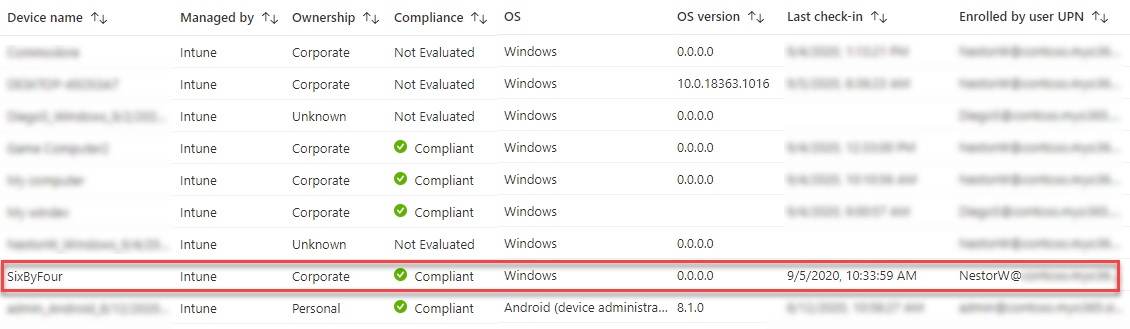
Under we are able to see the preliminary SyncML request that begins the decision again “dialogue”:
<SyncML>
	<SyncHdr>
		<VerDTD>1.2</VerDTD>
		<VerProto>DM/1.2</VerProto>
		<SessionID>1</SessionID>
		<MsgID>1</MsgID>
		<Goal>
			<LocURI>https://r.handle.microsoft.com/devicegatewayproxy/cimhandler.ashx</LocURI>
		</Goal>
		<Supply>
			<LocURI>SixByFour</LocURI>
		</Supply>
	</SyncHdr>
	<SyncBody>
		<Alert>
			<CmdID>1</CmdID>
			<Information>1201</Information>
		</Alert>
		<Change>
			<CmdID>2</CmdID>
			<Merchandise>
				<Supply>
					<LocURI>./DevInfo/Mod</LocURI>
				</Supply>
				<Information>Digital Machine</Information>
			</Merchandise>
			<Merchandise>
				<Supply>
					<LocURI>./DevInfo/DevId</LocURI>
				</Supply>
				<Information>SixByFour</Information>
			</Merchandise>
			<Merchandise>
				<Supply>
					<LocURI>./DevInfo/Man</LocURI>
				</Supply>
				<Information>Microsoft Company</Information>
			</Merchandise>
			<Merchandise>
				<Supply>
					<LocURI>./DevInfo/Lang</LocURI>
				</Supply>
				<Information>en-US</Information>
			</Merchandise>
			<Merchandise>
				<Supply>
					<LocURI>./DevInfo/DmV</LocURI>
				</Supply>
				<Information>1.3</Information>
			</Merchandise>
        </Change>
		<Remaining/>
	</SyncBody>
</SyncML>
Intune responses by saying that the request was okay (SyncHdr command = 200). Then it asks the values (GET) for sure settings.
<?xml model="1.0" encoding="utf-8"?>
<SyncML xmlns="SYNCML:SYNCML1.2">
	<SyncHdr>
		<VerDTD>1.2</VerDTD>
		<VerProto>DM/1.2</VerProto>
		<SessionID>1</SessionID>
		<MsgID>1</MsgID>
		<Goal>
			<LocURI>SixByFour</LocURI>
		</Goal>
		<Supply>
			<LocURI>https://r.handle.microsoft.com/devicegatewayproxy/cimhandler.ashx</LocURI>
		</Supply>
		<Meta>
			<MaxMsgSize xmlns="syncml:metinf">524288</MaxMsgSize>
		</Meta>
	</SyncHdr>
	<SyncBody>
		<Standing>
			<CmdID>1</CmdID>
			<MsgRef>1</MsgRef>
			<CmdRef>0</CmdRef>
			<Cmd>SyncHdr</Cmd>
			<Information>200</Information>
		</Standing>
		<Get>
			<CmdID>2</CmdID>
			<Merchandise>
				<Goal>
					<LocURI>./Vendor/MSFT/NodeCache/MSpercent20DMpercent20Server</LocURI>
				</Goal>
			</Merchandise>
		</Get>
		<Get>
			<CmdID>3</CmdID>
			<Merchandise>
				<Goal>
					<LocURI>./Vendor/MSFT/NodeCache/MSpercent20DMpercent20Server/CacheVersion</LocURI>
				</Goal>
			</Merchandise>
		</Get>
		<Get>
			<CmdID>4</CmdID>
			<Merchandise>
				<Goal>
					<LocURI>./Vendor/MSFT/NodeCache/MSpercent20DMpercent20Server/ChangedNodes</LocURI>
				</Goal>
			</Merchandise>
		</Get>
		<Get>
			<CmdID>5</CmdID>
			<Merchandise>
				<Goal>
					<LocURI>./DevDetail/SwV</LocURI>
				</Goal>
			</Merchandise>
		</Get>
		<Get>
			<CmdID>6</CmdID>
			<Merchandise>
				<Goal>
					<LocURI>./DevDetail/Ext/Microsoft/LocalTime</LocURI>
				</Goal>
			</Merchandise>
		</Get>
		<Get>
			<CmdID>7</CmdID>
			<Merchandise>
				<Goal>
					<LocURI>./Vendor/MSFT/WindowsLicensing/Version</LocURI>
				</Goal>
			</Merchandise>
		</Get>
		<Get>
			<CmdID>8</CmdID>
			<Merchandise>
				<Goal>
					<LocURI>./Vendor/MSFT/Replace/LastSuccessfulScanTime</LocURI>
				</Goal>
			</Merchandise>
		</Get>
		<Get>
			<CmdID>9</CmdID>
			<Merchandise>
				<Goal>
					<LocURI>./Vendor/MSFT/DeviceStatus/OS/Mode</LocURI>
				</Goal>
			</Merchandise>
		</Get>
		<Remaining />
	</SyncBody>
</SyncML>
Marking gadget compliant – choice 2: AAD Graph API
As I discussed earlier, Azure Energetic Listing integration with MDM documentation
states that MDM shoppers can report their compliance standing to Azure AD. Nevertheless, the doc additionally states that [Sep 29th 2020]:
That is solely relevant for authorised MDM apps on Home windows 10 gadgets.
Wait a minute! Does this imply that the MDM shopper can immediately report its compliance standing to Azure AD? Oh sure it does!
Primarily based on my exams, Azure AD doesn’t appear to care about which shopper is reporting the standing. In some tenants with some gadgets
I used to be capable of mark gadgets compliant as a daily consumer. Nevertheless, I couldn’t discover any logic behind the behaviour, some customers had been ready to do that whereas others couldn’t.
So this clearly requires extra analysis.
In any case, AADInternals v0.4.0 incorporates features for marking gadgets compliant and for itemizing their compliance standing.
To test the compliance standing of the gadget, use the next instructions:
# Get entry token
Get-AADIntAccessTokenForAADGraph -SaveToCache

# Get the gadget compliance
Get-AADIntDeviceCompliance -DeviceId "d03994c9-24f8-41ba-a156-1805998d6dc7"
displayName : SixByFour
objectId : 2eaa21a1-6362-4d3f-afc4-597592217ef0
deviceId : d03994c9-24f8-41ba-a156-1805998d6dc7
isCompliant : False
isManaged : True
deviceOwnership : Firm
deviceManagementAppId : 0000000a-0000-0000-c000-000000000000
As we are able to see, the gadget is managed however not compliant. To set it compliant, use the next command:
# Set the gadget compliant
Set-AADIntDeviceCompliant -DeviceId "d03994c9-24f8-41ba-a156-1805998d6dc7" -Compliant
displayName : SixByFour
objectId : 2eaa21a1-6362-4d3f-afc4-597592217ef0
deviceId : d03994c9-24f8-41ba-a156-1805998d6dc7
isCompliant : True
isManaged : True
deviceOwnership : Firm
deviceManagementAppId : 0000000a-0000-0000-c000-000000000000
Notice! As I discussed above, this typically work, typically not. Evidently the consumer altering
the standing needs to be administrator. I nonetheless want to determine the logic right here however
at the moment be at liberty to attempt!
Enrolling gadgets to Intune is a requirement for utilizing the compliance state in Conditional Entry (CA) insurance policies.
As I demonstrated, this doesn’t imply that they’d really be compliant! Emulating Intune shopper to present Intune “the proper solutions”
can be utilized make imaginary gadgets compliant and to bypass compliance associated CA insurance policies.








+ There are no comments
Add yours